Compare commits
13 Commits
v1.0.0-rc3
...
v1.0.2
| Author | SHA1 | Date | |
|---|---|---|---|

|
a154ffc197 | ||
|
|
c0a6e03fa7 | ||
|
|
fe706abdb5 | ||
|
|
1e5b89fa32 | ||
|
|
2a5d3e589f | ||
|
|
3ba65adc8b | ||
|
|
f90a7d5346 | ||
|
|
084e0e606e | ||
|
|
16c45544d3 | ||

|
556e9a0fbf | ||
|
|
a027c532fe | ||
|
|
681610241d | ||
|
|
02babe0022 |
@@ -10,7 +10,10 @@ If you are not a programmer, you can still contribute by:
|
||||
- If you want to, contributing financially through [Github Sponsors](https://github.com/sponsors/christiaangoossens)
|
||||
|
||||
## Code contributions
|
||||
You may also submit Pull Requests (PRs) to add features yourself! You can find a list that we are currently working on below. Please note that workflows will be run on your pull request and a pull request will only be merged when all checks pass and a review has been conducted (together with a manual test).
|
||||
You may also submit Pull Requests (PRs) to add features yourself! You can find TODOs to work on in the [Issue Tracker](https://github.com/christiaangoossens/hass-oidc-auth/issues), the [Feature Requests](https://github.com/christiaangoossens/hass-oidc-auth/discussions/categories/ideas) and in the [FAQ](./docs/faq.md).
|
||||
|
||||
|
||||
Please note that workflows will be run on your pull request (linting, tests, security audit) and a pull request will only be merged when all checks pass and a review has been conducted (together with a manual test).
|
||||
|
||||
### Development
|
||||
This project uses the uv package manager for development. You can find installation instructions here: https://docs.astral.sh/uv/getting-started/installation/. Start by installing the dependencies using `uv sync` and then point your editor towards the environment created in the .venv directory.
|
||||
|
||||
75
README.md
@@ -15,21 +15,20 @@
|
||||
<br />
|
||||
<div align="center">
|
||||
<a href="https://github.com/christiaangoossens/hass-oidc-auth/">
|
||||
<img src="logo.png" alt="Logo" width="80" height="80">
|
||||
<img src="https://raw.githubusercontent.com/christiaangoossens/hass-oidc-auth/main/docs/logo.png" alt="Logo" width="80" height="80">
|
||||
</a>
|
||||
|
||||
<h3 align="center">OpenID Connect for Home Assistant</h3>
|
||||
|
||||
<p align="center">
|
||||
OpenID Connect (OIDC) implementation for Home Assistant through a custom component/integration
|
||||
OpenID Connect (OIDC) implementation for Home Assistant through a custom component/integration,<br/>with a strong focus on <b>security, stability and accessibility.</b>
|
||||
<br />
|
||||
<br />
|
||||
<a href="./docs/usage.md">Usage Guide</a>
|
||||
<a href="https://github.com/christiaangoossens/hass-oidc-auth/blob/main/docs/configuration.md">YAML Configuration Guide</a>
|
||||
·
|
||||
<a href="./docs/configuration.md">Configuration Guide</a>
|
||||
<a href="https://github.com/christiaangoossens/hass-oidc-auth/blob/main/CONTRIBUTING.md">Contribution Guide</a>
|
||||
·
|
||||
<a href="./CONTRIBUTING.md">Contribution Guide</a>
|
||||
<br />
|
||||
<a href="https://github.com/christiaangoossens/hass-oidc-auth/blob/main/docs/faq.md">Frequently Asked Questions (FAQ)</a>
|
||||
<br />
|
||||
<a href="https://github.com/christiaangoossens/hass-oidc-auth/discussions?discussions_q=is%3Aopen+category%3AAnnouncements+category%3APolls">Announcements & Polls</a>
|
||||
·
|
||||
@@ -41,52 +40,64 @@
|
||||
</p>
|
||||
</div>
|
||||
|
||||
Provides an OpenID Connect (OIDC) implementation for Home Assistant through a custom component/integration. Through this integration, you can create an SSO (single-sign-on) environment within your self-hosted application stack / homelab.
|
||||
Provides a **stable and secure** OpenID Connect (OIDC) implementation for Home Assistant through a custom component/integration. With this integration, you can create a single-sign-on (SSO) environment in your self-hosted application stack / homelab.
|
||||
|
||||
### Background
|
||||
If you would like to read the background/open letter that lead to this component, you can find the original post at https://community.home-assistant.io/t/open-letter-for-improving-home-assistants-authentication-system-oidc-sso/494223. It is currently one of the most upvoted feature requests for Home Assistant.
|
||||
The core values for this integration are:
|
||||
|
||||
1. **Security**: strict adherence to the [OpenID Connect specification](https://openid.net/specs/openid-connect-core-1_0.html), [RFC 6749 (OAuth2)](https://datatracker.ietf.org/doc/html/rfc6749), [RFC 7519 (JWT)](https://datatracker.ietf.org/doc/html/rfc7519), [RFC 7636 (PKCE)](https://datatracker.ietf.org/doc/html/rfc7636) and [RFC 9700 (OAuth2 Security Best Practices)](https://datatracker.ietf.org/doc/html/rfc9700) as well as a focus on security tests in the automated test suite.
|
||||
2. **Stability**: minimal patching of the core Home Assistant code such that updates of HA are less likely to break the integration and leave you without a way to login.
|
||||
3. **Accessibility**: the integration should work for everyone as much as possible with default settings, regardless of your preferred authentication method.
|
||||
|
||||
**TLDR**: *Login to Home Assistant with this integration should 'just work', every time, for everyone in your household ([even your dad](https://github.com/home-assistant/architecture/issues/832#issuecomment-1328052330)), securely.*
|
||||
|
||||
If you are deciding if this integration is the right fit for your setup, please see the [Frequently Asked Questions (FAQ)](https://github.com/christiaangoossens/hass-oidc-auth/blob/main/docs/faq.md) for more information.
|
||||
|
||||
> [!TIP]
|
||||
> If you support the addition of this feature to the Home Assistant core, please upvote https://github.com/orgs/home-assistant/discussions/48. It's the successor of the Home Assistant Community post mentioned above (with almost 900 upvotes).
|
||||
|
||||
## Installation guide
|
||||
|
||||
1. Add this repository to [HACS](https://hacs.xyz/) (or search for "OpenID Connect" in HACS).
|
||||
The easiest way to install the integration is through [the Home Assistant Community Store (HACS)](https://hacs.xyz/). You can find usage instructions for HACS here: https://hacs.xyz/docs/use/.
|
||||
|
||||
After installing HACS, search for "OpenID Connect" in the HACS search box or click the button below:
|
||||
|
||||
[](https://my.home-assistant.io/redirect/hacs_repository/?owner=christiaangoossens&repository=hass-oidc-auth&category=Integration)
|
||||
|
||||
2. Add the YAML configuration that matches your OIDC provider to `configuration.yaml`. See the [Configuration Guide](./docs/configuration.md) for more details or pick your OIDC provider below:
|
||||
Next, set up your OIDC provider. You can find setup guides for common providers here:
|
||||
|
||||
| <img src="https://goauthentik.io/img/icon_top_brand_colour.svg" width="100"> | <img src="https://www.authelia.com/images/branding/logo-cropped.png" width="100"> | <img src="https://github.com/user-attachments/assets/4ceb2708-9f29-4694-b797-be833efce17d" width="100"> |
|
||||
|:-----------------------------------------------------------------------------------------:|:-------------------------------------------------------------------------------------:|:---------------------------------------------------------------------------------------:|
|
||||
| [Authentik](./docs/provider-configurations/authentik.md) | [Authelia](./docs/provider-configurations/authelia.md) | [Pocket ID](./docs/provider-configurations/pocket-id.md) |
|
||||
| <img src="https://goauthentik.io/img/icon_top_brand_colour.svg" width="100"> | <img src="https://www.authelia.com/images/branding/logo-cropped.png" width="100"> | <img src="https://github.com/user-attachments/assets/4ceb2708-9f29-4694-b797-be833efce17d" width="100"> |
|
||||
|:-----------------------------------------------------------------------------------------:|:-------------------------------------------------------------------------------------:|:---------------------------------------------------------------------------------------:|
|
||||
| [authentik](https://github.com/christiaangoossens/hass-oidc-auth/blob/main/docs/provider-configurations/authentik.md) | [Authelia](https://github.com/christiaangoossens/hass-oidc-auth/blob/main/docs/provider-configurations/authelia.md) | [Pocket ID](https://github.com/christiaangoossens/hass-oidc-auth/blob/main/docs/provider-configurations/pocket-id.md) |
|
||||
|
||||
By default, the integration assumes you configure Home Assistant as a **public client** and thus only specify the `client_id` and no `client_secret`. For example, your configuration might look like:
|
||||
You can also find additional provider guides in the [the Provider Configurations folder](https://github.com/christiaangoossens/hass-oidc-auth/tree/main/docs/provider-configurations). If your provider isn't specified, you can use either a **public client** (recommended) or **confidential client** with the callback URL set to `<your HA URL>/auth/oidc/callback`.
|
||||
|
||||
```yaml
|
||||
auth_oidc:
|
||||
client_id: "example"
|
||||
discovery_url: "https://example.com/.well-known/openid-configuration"
|
||||
```
|
||||
Finally, choose your preferred configuration style (UI or YAML). After configuration, you should automatically be sent to the OIDC login page(s) if you open Home Assistant (web or app).
|
||||
|
||||
When registering Home Assistant at your OIDC provider, use `<your HA URL>/auth/oidc/callback` as the callback URL and select 'public client'. You should now get the `client_id` and `issuer_url` or `discovery_url` to fill in.
|
||||
### Configuration in the HA UI
|
||||
|
||||
3. Restart Home Assistant
|
||||
The recommended setup method for beginners is through the "Integrations" panel within the Home Assistant UI.
|
||||
|
||||
4. Login through the OIDC Welcome URL at `<your HA URL>/auth/oidc/welcome`. You will have to go there manually for now. For example, it might be located at http://homeassistant.local:8123/auth/oidc/welcome.
|
||||
Many configuration options are available through this method, but some advanced features are only available in YAML to simplify the setup process in the UI.
|
||||
|
||||
More (detailed) usage instructions can be found in the [Usage Guide](./docs/usage.md).
|
||||
1. Open Home Assistant and go to **Settings -> Devices & Services**.
|
||||
2. Click Add Integration and select **OpenID Connect/SSO Authentication**.
|
||||
3. Follow the prompts on screen carefully.
|
||||
|
||||
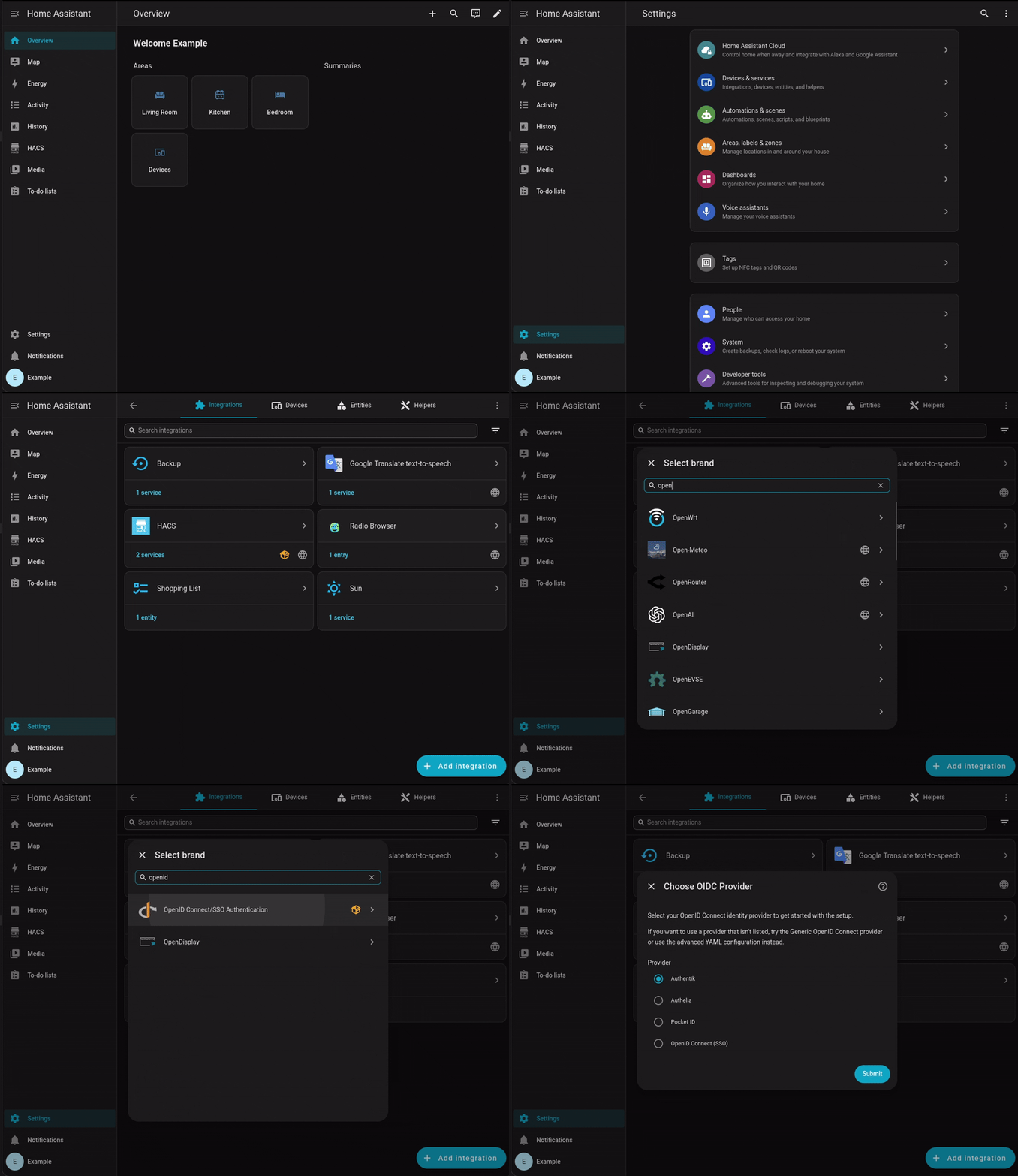
|
||||
|
||||
### Configuration by YAML
|
||||
|
||||
Alternatively, you can configure the integration using YAML. You can find a full configuration guide for YAML here: [YAML Configuration Guide](https://github.com/christiaangoossens/hass-oidc-auth/blob/main/docs/configuration.md).
|
||||
|
||||
## Contributions
|
||||
Contibutions are very welcome! If you program in Python or have worked with Home Assistant integrations before, please try to contribute. A list of requested contributions/future goals is in the [Contribution Guide](./CONTRIBUTING.md).
|
||||
Contributions are very welcome! If you program in Python or have worked with Home Assistant integrations before, please try to contribute. You can find more information in the [Contribution Guide](https://github.com/christiaangoossens/hass-oidc-auth/blob/main/CONTRIBUTING.md).
|
||||
|
||||
Please see the [Contribution Guide](./CONTRIBUTING.md) for more information.
|
||||
### Security issue?
|
||||
Please see [SECURITY.md](https://github.com/christiaangoossens/hass-oidc-auth/blob/main/SECURITY.md) for more information on how to submit your security issue securely. You can find previously found vulnerabilities and their corresponding security advisories at the [Security Advisories page](https://github.com/christiaangoossens/hass-oidc-auth/security/advisories).
|
||||
|
||||
### Found a security issue?
|
||||
Please see [SECURITY.md](./SECURITY.md) for more information on how to submit your security issue securely. You can find previously found vulnerablities and their corresponding security advisories at the [Security Advisories page](https://github.com/christiaangoossens/hass-oidc-auth/security/advisories).
|
||||
## Background
|
||||
If you would like to read the background/open letter that led to this component, you can find it at https://github.com/orgs/home-assistant/discussions/48. It is currently one of the most upvoted feature requests for Home Assistant.
|
||||
|
||||
## License
|
||||
Distributed under the MIT license with no warranty. You are fully liable for configuring this integration correctly to keep your Home Assistant installation secure. Use at your own risk. The full license can be found in [LICENSE.md](./LICENSE.md)
|
||||
Distributed under the MIT license with no warranty. You are fully liable for configuring this integration correctly to keep your Home Assistant installation secure. Use at your own risk. The full license can be found in [LICENSE.md](https://github.com/christiaangoossens/hass-oidc-auth/blob/main/LICENSE.md)
|
||||
|
||||
|
||||
<!-- MARKDOWN LINKS & IMAGES -->
|
||||
@@ -100,4 +111,4 @@ Distributed under the MIT license with no warranty. You are fully liable for con
|
||||
[issues-shield]: https://img.shields.io/github/issues/christiaangoossens/hass-oidc-auth.svg?style=for-the-badge
|
||||
[issues-url]: https://github.com/christiaangoossens/hass-oidc-auth/issues
|
||||
[license-shield]: https://img.shields.io/github/license/christiaangoossens/hass-oidc-auth.svg?style=for-the-badge
|
||||
[license-url]: https://github.com/christiaangoossens/hass-oidc-auth/blob/master/LICENSE.txt
|
||||
[license-url]: https://github.com/christiaangoossens/hass-oidc-auth/blob/main/LICENSE.md
|
||||
|
||||
@@ -6,6 +6,7 @@ from typing import OrderedDict
|
||||
|
||||
from homeassistant.config_entries import ConfigEntry
|
||||
from homeassistant.core import HomeAssistant
|
||||
from homeassistant.components.http import StaticPathConfig
|
||||
|
||||
# Import and re-export config schema explictly
|
||||
# pylint: disable=useless-import-alias
|
||||
@@ -27,6 +28,7 @@ from .config import (
|
||||
ROLES,
|
||||
NETWORK,
|
||||
FEATURES_INCLUDE_GROUPS_SCOPE,
|
||||
FEATURES_DEFAULT_REDIRECT,
|
||||
FEATURES_FORCE_HTTPS,
|
||||
REQUIRED_SCOPES,
|
||||
)
|
||||
@@ -42,6 +44,7 @@ from .endpoints import (
|
||||
OIDCDeviceSSE,
|
||||
)
|
||||
from .tools.oidc_client import OIDCClient
|
||||
from .tools.types import OIDCWelcomeOptions
|
||||
from .provider import OpenIDAuthProvider
|
||||
|
||||
_LOGGER = logging.getLogger(__name__)
|
||||
@@ -145,9 +148,28 @@ async def _setup_oidc_provider(hass: HomeAssistant, my_config: dict, display_nam
|
||||
name = re.sub(r"[^A-Za-z0-9 _\-\(\)]", "", name)
|
||||
|
||||
force_https = features_config.get(FEATURES_FORCE_HTTPS, False)
|
||||
default_redirect = features_config.get(FEATURES_DEFAULT_REDIRECT, False)
|
||||
|
||||
await hass.http.async_register_static_paths(
|
||||
[
|
||||
StaticPathConfig(
|
||||
"/auth/oidc/static/style.css",
|
||||
hass.config.path("custom_components/auth_oidc/static/style.css"),
|
||||
cache_headers=True,
|
||||
),
|
||||
]
|
||||
)
|
||||
|
||||
hass.http.register_view(
|
||||
OIDCWelcomeView(provider, name, force_https, has_other_auth_providers)
|
||||
OIDCWelcomeView(
|
||||
provider,
|
||||
OIDCWelcomeOptions(
|
||||
name=name,
|
||||
force_https=force_https,
|
||||
has_other_auth_providers=has_other_auth_providers,
|
||||
prefers_skipping=default_redirect,
|
||||
),
|
||||
)
|
||||
)
|
||||
hass.http.register_view(OIDCDeviceSSE(provider))
|
||||
hass.http.register_view(OIDCRedirectView(oidc_client, provider, force_https))
|
||||
|
||||
BIN
custom_components/auth_oidc/brand/icon.png
Normal file

|
After Width: | Height: | Size: 7.2 KiB |
BIN
custom_components/auth_oidc/brand/icon@2x.png
Normal file

|
After Width: | Height: | Size: 14 KiB |
@@ -8,7 +8,7 @@ from typing import Any, Dict
|
||||
|
||||
DEFAULT_TITLE = "OpenID Connect (SSO)"
|
||||
DOMAIN = "auth_oidc"
|
||||
REPO_ROOT_URL = "https://github.com/christiaangoossens/hass-oidc-auth/tree/v1.0.0-rc3"
|
||||
REPO_ROOT_URL = "https://github.com/christiaangoossens/hass-oidc-auth/tree/v1.0.2"
|
||||
|
||||
## ===
|
||||
## Config keys
|
||||
@@ -27,6 +27,7 @@ FEATURES_AUTOMATIC_PERSON_CREATION = "automatic_person_creation"
|
||||
FEATURES_DISABLE_PKCE = "disable_rfc7636"
|
||||
FEATURES_INCLUDE_GROUPS_SCOPE = "include_groups_scope"
|
||||
FEATURES_FORCE_HTTPS = "force_https"
|
||||
FEATURES_DEFAULT_REDIRECT = "default_redirect"
|
||||
CLAIMS = "claims"
|
||||
CLAIMS_DISPLAY_NAME = "display_name"
|
||||
CLAIMS_USERNAME = "username"
|
||||
|
||||
@@ -15,6 +15,7 @@ from .const import (
|
||||
FEATURES_DISABLE_PKCE,
|
||||
FEATURES_INCLUDE_GROUPS_SCOPE,
|
||||
FEATURES_FORCE_HTTPS,
|
||||
FEATURES_DEFAULT_REDIRECT,
|
||||
CLAIMS,
|
||||
CLAIMS_DISPLAY_NAME,
|
||||
CLAIMS_USERNAME,
|
||||
@@ -75,6 +76,13 @@ CONFIG_SCHEMA = vol.Schema(
|
||||
vol.Optional(FEATURES_FORCE_HTTPS, default=False): vol.Coerce(
|
||||
bool
|
||||
),
|
||||
# Welcome page will be skipped automatically if there are no
|
||||
# other auth providers.
|
||||
# This flag enables this behavior regardless of the amount
|
||||
# of other auth providers.
|
||||
vol.Optional(
|
||||
FEATURES_DEFAULT_REDIRECT, default=False
|
||||
): vol.Coerce(bool),
|
||||
}
|
||||
),
|
||||
# Determine which specific claims will be used from the id_token
|
||||
|
||||
@@ -75,13 +75,8 @@ async def frontend_injection(hass: HomeAssistant, force_https: bool) -> None:
|
||||
StaticPathConfig(
|
||||
"/auth/oidc/static/injection.js",
|
||||
hass.config.path("custom_components/auth_oidc/static/injection.js"),
|
||||
cache_headers=False,
|
||||
),
|
||||
StaticPathConfig(
|
||||
"/auth/oidc/static/style.css",
|
||||
hass.config.path("custom_components/auth_oidc/static/style.css"),
|
||||
cache_headers=False,
|
||||
),
|
||||
cache_headers=True,
|
||||
)
|
||||
]
|
||||
)
|
||||
|
||||
|
||||
@@ -1,6 +1,5 @@
|
||||
"""Welcome route to show the user the OIDC login button and give instructions."""
|
||||
|
||||
from ast import List
|
||||
import base64
|
||||
import binascii
|
||||
from urllib.parse import urlparse, parse_qs, unquote, urlencode
|
||||
@@ -8,6 +7,7 @@ from aiohttp import web
|
||||
from homeassistant.components.http import HomeAssistantView
|
||||
from ..tools.helpers import error_response, get_url, template_response
|
||||
from ..provider import OpenIDAuthProvider
|
||||
from ..tools.types import OIDCWelcomeOptions
|
||||
|
||||
PATH = "/auth/oidc/welcome"
|
||||
|
||||
@@ -20,18 +20,15 @@ class OIDCWelcomeView(HomeAssistantView):
|
||||
name = "auth:oidc:welcome"
|
||||
|
||||
def __init__(
|
||||
self,
|
||||
oidc_provider: OpenIDAuthProvider,
|
||||
name: str,
|
||||
force_https: bool,
|
||||
has_other_auth_providers: bool,
|
||||
self, oidc_provider: OpenIDAuthProvider, options: OIDCWelcomeOptions
|
||||
) -> None:
|
||||
self.oidc_provider = oidc_provider
|
||||
self.name = name
|
||||
self.force_https = force_https
|
||||
self.has_other_auth_providers = has_other_auth_providers
|
||||
self.name = options.get("name")
|
||||
self.force_https = options.get("force_https")
|
||||
self.has_other_auth_providers = options.get("has_other_auth_providers")
|
||||
self.prefers_skipping = options.get("prefers_skipping")
|
||||
|
||||
async def _process_url(self, redirect_uri: str) -> List[str, bool]:
|
||||
async def _process_url(self, redirect_uri: str) -> tuple[str, bool]:
|
||||
"""Processes the redirect URI to determine if we need setTokens and if this is mobile."""
|
||||
# decodeURIComponent(btoa(...)) -> unquote first, then base64 decode
|
||||
redirect_uri = base64.b64decode(unquote(redirect_uri), validate=True).decode(
|
||||
@@ -108,7 +105,9 @@ class OIDCWelcomeView(HomeAssistantView):
|
||||
|
||||
# If this is the only provider and we are on desktop,
|
||||
# automatically go through the OIDC login
|
||||
if not is_mobile and not self.has_other_auth_providers:
|
||||
if not is_mobile and (
|
||||
not self.has_other_auth_providers or self.prefers_skipping
|
||||
):
|
||||
raise web.HTTPFound(
|
||||
location=get_url("/auth/oidc/redirect", self.force_https),
|
||||
headers=cookie_header,
|
||||
|
||||
@@ -18,5 +18,5 @@
|
||||
"jinja2",
|
||||
"joserfc"
|
||||
],
|
||||
"version": "1.0.0-rc3"
|
||||
"version": "1.0.2"
|
||||
}
|
||||
@@ -39,3 +39,19 @@ class OIDCState(dict):
|
||||
|
||||
# IP address
|
||||
ip_address: str | None
|
||||
|
||||
|
||||
class OIDCWelcomeOptions(dict):
|
||||
"""Options for the welcome screen"""
|
||||
|
||||
# User friendly SSO name to display
|
||||
name: str
|
||||
|
||||
# Does the user force HTTPS on all generated URLs?
|
||||
force_https: bool
|
||||
|
||||
# Has the user registered any other auth providers?
|
||||
has_other_auth_providers: bool
|
||||
|
||||
# Does the user prefer to skip the welcome screen?
|
||||
prefers_skipping: bool
|
||||
|
||||
@@ -6,7 +6,7 @@
|
||||
<meta charset="UTF-8">
|
||||
<meta name="viewport" content="width=device-width, initial-scale=1.0">
|
||||
<title>{% block title %}{% endblock %}</title>
|
||||
<link rel="stylesheet" href="/auth/oidc/static/style.css">
|
||||
<link rel="stylesheet" href="/auth/oidc/static/style.css?v=2">
|
||||
{% endblock %}
|
||||
</head>
|
||||
|
||||
|
||||
@@ -24,11 +24,8 @@
|
||||
</div>
|
||||
|
||||
<div class="rounded-lg border border-gray-300 bg-white p-6 text-left">
|
||||
<div class="mb-4 flex items-center justify-between text-gray-700">
|
||||
<span class="text-lg font-semibold">Use a code from another device</span>
|
||||
</div>
|
||||
<div class="border-t border-gray-200 pt-4">
|
||||
<p class="mb-2 text-sm text-gray-600">On your other device, open the Home Assistant app. You will see a
|
||||
<h2 class="mb-2 text-lg font-semibold text-gray-800">Use a code from another device</h2>
|
||||
<p class="mb-2 text-sm text-gray-600">On your other device, open the Home Assistant app. You will see a
|
||||
6-digit code.</p>
|
||||
<p class="mb-4 text-sm text-gray-600">Input that code here and click Approve to login on the other device.
|
||||
</p>
|
||||
@@ -60,7 +57,6 @@
|
||||
Approve login on the other device
|
||||
</button>
|
||||
</form>
|
||||
</div>
|
||||
</div>
|
||||
</div>
|
||||
{% endblock %}
|
||||
@@ -1,9 +1,12 @@
|
||||
# Configuration methods
|
||||
# UI Configuration
|
||||
|
||||
Currently, the only available configuration method is YAML in your `configuration.yaml` file. In the future, we will also add limited UI configuration for the most common configurations (Authentik, Authelia and Pocket-ID). Advanced users will need to use the YAML configuration in any case.
|
||||
If you want to use the (limited) UI configuration method, please see [the README](../README.md).
|
||||
|
||||
# YAML Configuration
|
||||
For now, this integration is configured using YAML in your `configuration.yaml` file. By default, only two fields are required:
|
||||
|
||||
You can configure this integration using YAML in your `configuration.yaml` file. All features of the integration will always be available within the YAML configuration.
|
||||
|
||||
By default, only two fields are required:
|
||||
|
||||
```yaml
|
||||
auth_oidc:
|
||||
@@ -11,7 +14,7 @@ auth_oidc:
|
||||
discovery_url: ""
|
||||
```
|
||||
|
||||
The default settings assume that you configure Home Assistant as a **public client**, without a client secret. If so, you should only need to provide the `client_id` from your OIDC provider and it's discovery URL (ending in `.well-known/openid-configuration`).
|
||||
The default settings assume that you configure Home Assistant as a **public client**, without a client secret. If so, you should only need to provide the `client_id` from your OIDC provider and its discovery URL (ending in `.well-known/openid-configuration`).
|
||||
You don't have to configure other settings in most cases, as they have secure defaults set. If your provider requires manually configuring the callback URL, use `<your HA URL>/auth/oidc/callback`.
|
||||
|
||||
## Provider Configurations
|
||||
@@ -75,6 +78,19 @@ auth_oidc:
|
||||
|
||||
This will show the provider on the login screen as: "Login with Example".
|
||||
|
||||
### Skipping the welcome screen
|
||||
If you would like to skip the welcome screen, you can either enable the `features.default_redirect` feature, or [disable the Home Assistant auth provider](https://github.com/christiaangoossens/hass-oidc-auth/discussions/67).
|
||||
|
||||
If you want to keep the default login (backup login) enabled, but still skip the welcome screen by default, you can configure the following yaml:
|
||||
|
||||
```yaml
|
||||
auth_oidc:
|
||||
features:
|
||||
default_redirect: true
|
||||
```
|
||||
|
||||
If you have this feature enabled and you would like to use the backup login, make sure to append `?skip_oidc_redirect=true` to your login URL. For example, if your HA is at `https://ha.example.com`, you can go to `https://ha.example.com/?skip_oidc_redirect=true` to see the HA username/password login screen.
|
||||
|
||||
### Forcing HTTPS
|
||||
First check if you are setting the header `X-Forwarded-Proto` in your proxy and if the [proxy settings for Home Assistant](https://www.home-assistant.io/integrations/http/#use_x_forwarded_for) are configured correctly. You should also check if IP addresses in your logs actually match the origin IP (instead of proxy IP). If you cannot find any mistakes, you may use the following config option to force HTTPS regardless:
|
||||
|
||||
@@ -86,7 +102,7 @@ auth_oidc:
|
||||
|
||||
### Disabling registration for new users
|
||||
This integration does not allow disabling registration for new users, as there is no way to abort registration that late in the process while providing a good user experience.
|
||||
You can however set both roles to groups that only contain certain users or to a non-existant group.
|
||||
You can however set both roles to groups that only contain certain users or to a non-existent group.
|
||||
|
||||
```yaml
|
||||
auth_oidc:
|
||||
@@ -151,18 +167,18 @@ Here's a table of all options that you can set:
|
||||
| `discovery_url` | `string` | Yes | | The OIDC well-known configuration URL. |
|
||||
| `display_name` | `string` | No | `"OpenID Connect (SSO)"` | The name to display on the login screen, both for the Home Assistant screen and the OIDC welcome screen. |
|
||||
| `id_token_signing_alg` | `string` | No | `RS256` | The signing algorithm that is used for your id_tokens.
|
||||
| `groups_scope` | `string` | No | `groups` | Override the default grups scope with another scope of your choice. |
|
||||
| `groups_scope` | `string` | No | `groups` | Override the default groups scope with another scope of your choice. |
|
||||
| `additional_scopes`|`list of strings`| No | `empty list` | Add additional scopes to request for custom identity provider configurations in addition to the automatic `openid` and `profile` scopes and the `groups_scope` configuration option |
|
||||
| `features.automatic_user_linking` | `boolean`| No | `false` | Automatically links users to existing Home Assistant users based on the OIDC username claim. Disabled by default for security. When disabled, OIDC users will get their own new user profile upon first login. |
|
||||
| `features.automatic_person_creation` | `boolean` | No | `true` | Automatically creates a person entry for new user profiles created by this integration. Recommended if you would like to assign presence detection to OIDC users. |
|
||||
| `features.disable_rfc7636` | `boolean`| No | `false` | Disables PKCE (RFC 7636) for OIDC providers that don't support it. You should not need this with most providers. |
|
||||
| `features.include_groups_scope` | `boolean` | No | `true` | Include the 'groups' scope in the OIDC request. Set to `false` to exclude it. |
|
||||
| `features.disable_frontend_changes` | `boolean` | No | `false` | Set to `true` to disable all changes made to the HA frontend for better compatbility with future HA versions, or if you are not comfortable with injecting Javascript into the existing frontend code. |
|
||||
| `features.force_https` | `boolean` | No | `false` | Set to `true` to force all URLs generated to use `https` instead of automatically determining based on the request scheme or `X-Forwarded-Proto`. |
|
||||
| `features.default_redirect` | `boolean` | No | `false` | Set to `true` to always skip the welcome screen (on desktop), regardless of if there are any other auth providers registered. |
|
||||
| `claims.display_name` | `string` | No | `name` | The claim to use to obtain the display name.
|
||||
| `claims.username` | `string` | No | `preferred_username` | The claim to use to obtain the username.
|
||||
| `claims.groups` | `string` | No | `groups` | The claim to use to obtain the user's group(s). |
|
||||
| `roles.admin` | `string` | No | `admins` | Group name to require for users to get the 'admin' role in Home Assistant. Defaults to 'admins', the default group name for admins in Authentik. Doesn't do anything if no groups claim is found in your token. |
|
||||
| `roles.user` | `string` | No | | Group name to require for users to get the 'user' role in Home Assistant. Defaults to giving all users this role, unless configured. |
|
||||
| `network.tls_verify` | `boolean` | No | `true` | Verify TLS certificate. You may want to set this set to `false` when testing locally. |
|
||||
| `network.tls_verify` | `boolean` | No | `true` | Verify TLS certificate. You may want to set this to `false` when testing locally. |
|
||||
| `network.tls_ca_path` | `string` | No | | Path to file containing a private certificate authority chain. |
|
||||
|
||||
59
docs/faq.md
Normal file
@@ -0,0 +1,59 @@
|
||||
# Frequently Asked Questions
|
||||
|
||||
## What are the values of this project? Why would I choose this integration over alternatives?
|
||||
|
||||
Provides a **stable and secure** OpenID Connect (OIDC) implementation for Home Assistant through a custom component/integration. With this integration, you can create a single-sign-on (SSO) environment in your self-hosted application stack / homelab.
|
||||
|
||||
The core values for this integration are:
|
||||
|
||||
1. **Security**: strict adherence to the [OpenID Connect specification](https://openid.net/specs/openid-connect-core-1_0.html), [RFC 6749 (OAuth2)](https://datatracker.ietf.org/doc/html/rfc6749), [RFC 7519 (JWT)](https://datatracker.ietf.org/doc/html/rfc7519), [RFC 7636 (PKCE)](https://datatracker.ietf.org/doc/html/rfc7636) and [RFC 9700 (OAuth2 Security Best Practices)](https://datatracker.ietf.org/doc/html/rfc9700) as well as a focus on security tests in the automated test suite.
|
||||
2. **Stability**: minimal patching of the core Home Assistant code such that updates of HA are less likely to break the integration and leave you without a way to login.
|
||||
3. **Accessibility**: the integration should work for everyone as much as possible with default settings, regardless of your preferred authentication method.
|
||||
|
||||
**TLDR**: *Login to Home Assistant with this integration should 'just work', every time, for everyone in your household ([even your dad](https://github.com/home-assistant/architecture/issues/832#issuecomment-1328052330)), securely.*
|
||||
|
||||
## Is the integration stable?
|
||||
|
||||
Yes, this integration has been tested in production environments for multiple years and has almost full automated test coverage to test both security and regressions. Security issues as well as dependency updates are actively monitored through automated pipelines and [a security policy is available here](../SECURITY.md).
|
||||
|
||||
## What does this integration not do (yet)?
|
||||
|
||||
The integration is currently very suitable for homelab use, but not for enterprise use, because these specs/todos have not been implemented yet:
|
||||
|
||||
- [OpenID Connect Session Management 1.0](https://openid.net/specs/openid-connect-session-1_0.html): users that are disabled at the IdP do not get logged out in Home Assistant until their refresh token expires/they logout manually
|
||||
- [OpenID Connect Front-Channel Logout 1.0](https://openid.net/specs/openid-connect-frontchannel-1_0.html): logout in Home Assistant does not automatically log the user out at the IdP
|
||||
- [OpenID Connect Back-Channel Logout 1.0 incorporating errata set 1](https://openid.net/specs/openid-connect-backchannel-1_0.html)
|
||||
- *Open TODO*: Permissions are only set upon first login (https://github.com/christiaangoossens/hass-oidc-auth/discussions/187), as permission changes would necessitate revoking refresh tokens/implementing session management
|
||||
- Other RFC's and best practices with regards to token expiration and revocation in the app itself
|
||||
|
||||
These features are hard to implement correctly within a custom integration, as they involve the full authentication lifecycle. Home Assistant does currently implement some features to see which refresh tokens were issued (and thus which sessions are open), which work well with this integration, but lacks any further security focussed features.
|
||||
|
||||
For home use where users rarely change permissions/status, these features aren't commonly required. However, if you would like to help implement any of these specifications (while sticking to the value of 'Stability' and minimal Home Assistant core code patching), feel free to create a PR.
|
||||
|
||||
## Why does this integration only allow for sign-in on mobile with a device code?
|
||||
Several attempts have been made at implementing a direct mobile sign-in, but due to many issues (which can be found in https://github.com/orgs/home-assistant/discussions/48 and https://github.com/christiaangoossens/hass-oidc-auth/discussions/95), an approach was chosen that works for all setups and all authentication methods. The mobile apps now show a code, which can be entered into either the Chrome (Android)/Safari (iOS) apps on the mobile device or on another computer, after which the app automatically links and continues with the setup.
|
||||
|
||||
If you would like to make another attempt at implementing direct sign-in anyway, please submit a PR.
|
||||
|
||||
## I am using a proxy setup where my reverse proxy authenticates users
|
||||
This integration is intended to be public-facing (as most OIDC apps). If you are authenticating users at the reverse proxy level (such as if you are migrating from https://github.com/BeryJu/hass-auth-header), **you should remove this authentication layer after installing this integration.**.
|
||||
|
||||
In general, make sure to set your Home Assistant configuration correctly for your reverse proxy as well (see https://www.home-assistant.io/integrations/http/#reverse-proxies). It is important that the original visitor IP is passed through to Home Assistant for optimal security.
|
||||
|
||||
## Help! I have no styling/CSS!
|
||||
Did you install the integration using HACS, or directly using the `hass-oidc-auth.zip` from the release? If so, this might be a bug. Please submit an issue so we can debug this.
|
||||
|
||||
If you installed the integration by cloning master/downloading the source code (either from Github or the releases page), this is intended. You are using a development build in that case, for which you need to build the styles yourself using these instructions: [CONTRIBUTING.md](./CONTRIBUTING.md#compiling-css).
|
||||
|
||||
Installing development builds is not recommended! See the question below for more information.
|
||||
|
||||
## Why should I only install releases (either from Github or HACS) instead of using the source code?
|
||||
The `main` branch is in constant development, both manually (PR's) as well as automatically (Renovate Bot/dependency management). While a CI pipeline with tests is run on the `main` branch, manual tests are only performed upon PR merge and during the release creation.
|
||||
|
||||
Therefore, issues that occur because of the use of the `main` branch (or any other specific commmit/release source code) will not be processed. At any time, the state of `main` may be broken, as it is only intended for development.
|
||||
|
||||
Releases, available at [Releases](https://github.com/christiaangoossens/hass-oidc-auth/releases), by constrast, are immutable and tested manually before release. While a release may be deleted, releases cannot be altered after publishing.
|
||||
|
||||
This ensures that - even if a security issue with my accounts occured - no malicious code enters an existing release and that the release is installed exactly as intended.
|
||||
|
||||
HACS automatically - and only - uses these releases and is thus the recommended install method. If you want to install a release manually, please specifically use the `hass-oidc-auth.zip` (and not the release source code zip), such that you get styling.
|
||||

|
Before Width: | Height: | Size: 21 KiB After Width: | Height: | Size: 21 KiB |
@@ -1,6 +1,22 @@
|
||||
# Authelia
|
||||
|
||||
## Public client configuration
|
||||
> [!TIP]
|
||||
> This guide describes configuring Authelia using the UI method. You can also configure Authelia by hand with YAML. Instructions for configuring any provider using YAML can be found here: [YAML Configuration Guide](../configuration.md).
|
||||
|
||||
|
||||
## Step 1. Install the integration
|
||||
|
||||
Make sure that you have fully installed the latest release of the integration. The easiest way to install the integration is through [the Home Assistant Community Store (HACS)](https://hacs.xyz/). You can find usage instructions for HACS here: https://hacs.xyz/docs/use/.
|
||||
|
||||
After installing HACS, search for "OpenID Connect" in the HACS search box or click the button below:
|
||||
|
||||
[](https://my.home-assistant.io/redirect/hacs_repository/?owner=christiaangoossens&repository=hass-oidc-auth&category=Integration)
|
||||
|
||||
## Step 2. Configure Authelia
|
||||
|
||||
You can choose between configuring Authelia as a public or confidential client.
|
||||
|
||||
### Public client configuration
|
||||
|
||||
> [!NOTE]
|
||||
> This configuration strictly requires a HTTPS redirect uri.
|
||||
@@ -17,24 +33,11 @@ identity_providers:
|
||||
public: true
|
||||
require_pkce: true
|
||||
pkce_challenge_method: 'S256'
|
||||
authorization_policy: 'two_factor'
|
||||
redirect_uris:
|
||||
- 'https://hass.example.com/auth/oidc/callback'
|
||||
scopes:
|
||||
- 'openid'
|
||||
- 'profile'
|
||||
- 'groups'
|
||||
id_token_signed_response_alg: 'RS256'
|
||||
```
|
||||
|
||||
Home Assistant `configuration.yaml`
|
||||
```yaml
|
||||
auth_oidc:
|
||||
client_id: "homeassistant"
|
||||
discovery_url: "https://auth.example.com/.well-known/openid-configuration"
|
||||
```
|
||||
|
||||
## Confidential client configuration:
|
||||
### Confidential client configuration:
|
||||
|
||||
Authelia `configuration.yml`
|
||||
```yaml
|
||||
@@ -49,21 +52,43 @@ identity_providers:
|
||||
public: false
|
||||
require_pkce: true
|
||||
pkce_challenge_method: 'S256'
|
||||
authorization_policy: 'two_factor'
|
||||
redirect_uris:
|
||||
- 'https://hass.example.com/auth/oidc/callback'
|
||||
scopes:
|
||||
- 'openid'
|
||||
- 'profile'
|
||||
- 'groups'
|
||||
id_token_signed_response_alg: 'RS256'
|
||||
token_endpoint_auth_method: 'client_secret_post'
|
||||
```
|
||||
|
||||
Home Assistant `configuration.yaml`
|
||||
```yaml
|
||||
auth_oidc:
|
||||
client_id: "homeassistant"
|
||||
client_secret: "insecure_secret"
|
||||
discovery_url: "https://auth.example.com/.well-known/openid-configuration"
|
||||
```
|
||||
## Step 3. Home Assistant configuration
|
||||
|
||||
The recommended setup method for beginners is through the "Integrations" panel within the Home Assistant UI. You can also use YAML setup, for which you can find the configuration guide here: [YAML Configuration Guide](../configuration.md).
|
||||
|
||||
1. Open Home Assistant and go to **Settings -> Devices & Services**.
|
||||
2. Click Add Integration and select **OpenID Connect/SSO Authentication**.
|
||||
|
||||

|
||||
|
||||
3. Now click "Authelia" and continue to the next screen
|
||||
4. Set the discovery URL to `https://<your Authelia URL>/.well-known/openid-configuration` and click **Submit**
|
||||
|
||||

|
||||
|
||||
5. Your URL will be tested. You may see an error, such as the picture below. Check your URL and verify that Home Assistant can access your Authelia installation. Change the URL or retry.
|
||||
|
||||

|
||||
|
||||
6. If your discovery URL is tested succesfully, you will see something like this and you can continue with the **Submit** button to continue.
|
||||
|
||||
|
||||

|
||||
|
||||
7. You will then be prompted to fill in the client details, the **Client ID** and the **Client Secret** (if you used the Public Client type in the Authelia configuration, there is no Client Secret required). Paste them in the relevant input boxes and continue setup with **Submit**.
|
||||
|
||||

|
||||
|
||||
8. You will then be asked about **Groups & Role Configuration** and **User Linking**. Configure these options as you wish or leave the defaults in place. You can also change these settings later by opening the integration settings and clicking the reconfiguration icon.
|
||||
|
||||
|
||||

|
||||
|
||||
## Done!
|
||||
|
||||
You should now automatically see the welcome screen upon opening your Home Assistant URL. On the welcome screen you can choose to either start login through SSO or to use an alternative login method, which will bring you back to the normal Home Assistant username/password login screen.
|
||||
@@ -1,40 +1,63 @@
|
||||
# Authentik
|
||||
# authentik
|
||||
|
||||
## Public client configuration
|
||||
Under construction.
|
||||
> [!TIP]
|
||||
> This guide describes configuring authentik using the UI method. You can also configure authentik by hand with YAML. Instructions for configuring any provider using YAML can be found here: [YAML Configuration Guide](../configuration.md).
|
||||
|
||||
## Confidential client configuration
|
||||
|
||||
1. From the admin interface, go to `Applications > Providers` and click on `Create`
|
||||
2. Select `OAuth2/OpenID Provider` and click `Next`
|
||||
3. Fill the following details:
|
||||
- Name: `Home Assistant Provider`
|
||||
- Authorization flow: `default-provider-authorization-explicit-consent`
|
||||
- Client type: `Confidential`
|
||||
- Client ID: `homeassistant`
|
||||
- Client Secret: **Copy this value**
|
||||
- Redirect URIs/Origins: Click on `Add entry` (You can use either DNS, Internal/External IP or localhost)
|
||||
- Strict: https://hass.example.com/auth/oidc/callback
|
||||
4. Click `Finish` to save the provider configuration
|
||||
5. Open the created Provider
|
||||
6. On the Assigned to application section click on `Create`:
|
||||
- Name: `Home Assistant`
|
||||
- Slug: `home-assistant`
|
||||
- Provider: `Home Assistant Provider`
|
||||
## Step 1. Install the integration
|
||||
|
||||
Then save the configuration
|
||||
Make sure that you have fully installed the latest release of the integration. The easiest way to install the integration is through [the Home Assistant Community Store (HACS)](https://hacs.xyz/). You can find usage instructions for HACS here: https://hacs.xyz/docs/use/.
|
||||
|
||||
## Home Assistant configuration
|
||||
After installing HACS, search for "OpenID Connect" in the HACS search box or click the button below:
|
||||
|
||||
> [!IMPORTANT]
|
||||
> For HTTPS configuration make sure to have a public valid SSL certificate (i.e. LetsEncrypt), if not, use HTTP instead (more insecure) or add your Authentik CA certificate to `network.tls_ca_path`.
|
||||
[](https://my.home-assistant.io/redirect/hacs_repository/?owner=christiaangoossens&repository=hass-oidc-auth&category=Integration)
|
||||
|
||||
After installing this HACS addon, edit your `configuration.yaml` file and add:
|
||||
```yaml
|
||||
auth_oidc:
|
||||
client_id: "homeassistant"
|
||||
client_secret: "client_secret"
|
||||
discovery_url: "https://auth.example.com/application/o/home-assistant/.well-known/openid-configuration"
|
||||
```
|
||||
## Step 2. Configure authentik
|
||||
|
||||
Restart Home Assistant and go to https://hass.example.com/auth/oidc/welcome
|
||||
1. Log in to authentik as an administrator and open the authentik Admin interface.
|
||||
|
||||
2. Navigate to **Applications > Applications** and click **Create with Provider** to create an application and provider pair. (Alternatively you can first create a provider separately, then create the application and connect it with the provider.)
|
||||
|
||||
- **Application**: provide a descriptive name, an optional group for the type of application, the policy engine mode, and optional UI settings.
|
||||
- Choose a **Provider Type**: select **OAuth2/OpenID Connect** as the provider type.
|
||||
- **Configure the Provider**: provide a name (or accept the auto-provided name), the authorization flow to use for this provider, and the following required configurations.
|
||||
- Note the **Client ID**, **Client Secret**, and **slug** values because they will be required later.
|
||||
- Set a `Strict` redirect URI to `https://<your HA URL>/auth/oidc/callback`.
|
||||
- Select any available signing key (to use the RS256 `id_token_signing_alg`)
|
||||
- Configure Bindings (optional): you can create a binding (policy, group, or user) to manage the listing and access to applications on a user's **My applications** page.
|
||||
|
||||
## Step 3. Home Assistant configuration
|
||||
|
||||
The recommended setup method for beginners is through the "Integrations" panel within the Home Assistant UI. You can also use YAML setup, for which you can find the configuration guide here: [YAML Configuration Guide](../configuration.md).
|
||||
|
||||
1. Open Home Assistant and go to **Settings -> Devices & Services**.
|
||||
2. Click Add Integration and select **OpenID Connect/SSO Authentication**.
|
||||
|
||||

|
||||
|
||||
3. Now click "Authentik" and continue to the next screen
|
||||
4. Set the discovery URL to `https://<your Authentik URL>/application/o/<application_slug>/.well-known/openid-configuration` using the **slug** from the earlier authentik configuration step and click **Submit**
|
||||
|
||||

|
||||
|
||||
5. Your URL will be tested. You may see an error, such as the picture below. Check your URL and verify that Home Assistant can access your authentik installation. Change the URL or retry.
|
||||
|
||||

|
||||
|
||||
6. If your discovery URL is tested succesfully, you will see something like this and you can continue with the **Submit** button to continue.
|
||||
|
||||
|
||||

|
||||
|
||||
7. You will then be prompted to fill in the client details, the **Client ID** and the **Client Secret** (if you used the Public Client type in authentik, there is no Client Secret required). Paste them in the relevant input boxes and continue setup with **Submit**.
|
||||
|
||||

|
||||
|
||||
8. You will then be asked about **Groups & Role Configuration** and **User Linking**. Configure these options as you wish or leave the defaults in place. You can also change these settings later by opening the integration settings and clicking the reconfiguration icon.
|
||||
|
||||
|
||||

|
||||
|
||||
## Done!
|
||||
|
||||
You should now automatically see the welcome screen upon opening your Home Assistant URL. On the welcome screen you can choose to either start login through SSO or to use an alternative login method, which will bring you back to the normal Home Assistant username/password login screen.
|
||||
@@ -1,8 +1,23 @@
|
||||
# Pocket ID
|
||||
|
||||
## Public client configuration
|
||||
> [!TIP]
|
||||
> This guide describes configuring Pocket ID using the UI method. You can also configure Pocket ID by hand with YAML. Instructions for configuring any provider using YAML can be found here: [YAML Configuration Guide](../configuration.md).
|
||||
|
||||
|
||||
## Step 1. Install the integration
|
||||
|
||||
Make sure that you have fully installed the latest release of the integration. The easiest way to install the integration is through [the Home Assistant Community Store (HACS)](https://hacs.xyz/). You can find usage instructions for HACS here: https://hacs.xyz/docs/use/.
|
||||
|
||||
After installing HACS, search for "OpenID Connect" in the HACS search box or click the button below:
|
||||
|
||||
[](https://my.home-assistant.io/redirect/hacs_repository/?owner=christiaangoossens&repository=hass-oidc-auth&category=Integration)
|
||||
|
||||
## Step 2. Configure Pocket ID
|
||||
|
||||
You can choose between configuring Pocket ID as a public or confidential client.
|
||||
|
||||
### Public client configuration
|
||||
|
||||
### Pocket ID configuration
|
||||
1. Login to Pocket ID and go to `OIDC Clients`
|
||||
|
||||
2. Click on `Add OIDC Client`
|
||||
@@ -16,19 +31,8 @@
|
||||
|
||||
5. Click on `Show more details` and note down your `Client ID` and `OIDC Discovery URL` since you will need them later.
|
||||
|
||||
### Home Assistant configuration
|
||||
1. Add following configuration in Home Assistant's configuration.yaml:
|
||||
```yaml
|
||||
auth_oidc:
|
||||
client_id: <The Client ID you have noted down>
|
||||
discovery_url: <The OIDC Discovery URL you have noted down> (for example: https://id.example.com/.well-known/openid-configuration)
|
||||
```
|
||||
### Confidential client configuration:
|
||||
|
||||
2. Restart Home Assistant and go to your Home Assistant OIDC URL (for example: https://hass.example.com/auth/oidc/welcome)
|
||||
|
||||
## Confidential client configuration
|
||||
|
||||
### Pocket ID configuration
|
||||
1. Login to Pocket ID and go to `OIDC Clients`
|
||||
|
||||
2. Click on `Add OIDC Client`
|
||||
@@ -44,15 +48,38 @@ auth_oidc:
|
||||
- `Client secret`
|
||||
- `OIDC Discovery URL`
|
||||
|
||||
### Home Assistant configuration
|
||||
1. Add following configuration in Home Assistant's configuration.yaml:
|
||||
```yaml
|
||||
auth_oidc:
|
||||
client_id: <The Client ID you have noted down>
|
||||
client_secret: <The Client secret you have noted down>
|
||||
discovery_url: <The OIDC Discovery URL you have noted down> (for example: https://id.example.com/.well-known/openid-configuration)
|
||||
```
|
||||
## Step 3. Home Assistant configuration
|
||||
|
||||
2. Restart Home Assistant and go to your Home Assistant OIDC URL (for example: https://hass.example.com/auth/oidc/welcome)
|
||||
The recommended setup method for beginners is through the "Integrations" panel within the Home Assistant UI. You can also use YAML setup, for which you can find the configuration guide here: [YAML Configuration Guide](../configuration.md).
|
||||
|
||||
1. Open Home Assistant and go to **Settings -> Devices & Services**.
|
||||
2. Click Add Integration and select **OpenID Connect/SSO Authentication**.
|
||||
|
||||

|
||||
|
||||
3. Now click "Pocket ID" and continue to the next screen
|
||||
4. Set the discovery URL to `https://<your Pocket ID URL>/.well-known/openid-configuration` and click **Submit**
|
||||
|
||||

|
||||
|
||||
5. Your URL will be tested. You may see an error, such as the picture below. Check your URL and verify that Home Assistant can access your Pocket ID installation. Change the URL or retry.
|
||||
|
||||

|
||||
|
||||
6. If your discovery URL is tested succesfully, you will see something like this and you can continue with the **Submit** button to continue.
|
||||
|
||||
|
||||

|
||||
|
||||
7. You will then be prompted to fill in the client details, the **Client ID** and the **Client Secret** (if you used the Public Client type in the Pocket ID configuration, there is no Client Secret required). Paste them in the relevant input boxes and continue setup with **Submit**.
|
||||
|
||||

|
||||
|
||||
8. You will then be asked about **Groups & Role Configuration** and **User Linking**. Configure these options as you wish or leave the defaults in place. You can also change these settings later by opening the integration settings and clicking the reconfiguration icon.
|
||||
|
||||
|
||||

|
||||
|
||||
## Done!
|
||||
|
||||
You should now automatically see the welcome screen upon opening your Home Assistant URL. On the welcome screen you can choose to either start login through SSO or to use an alternative login method, which will bring you back to the normal Home Assistant username/password login screen.
|
||||
BIN
docs/ui-config-steps/client-details.png
Normal file

|
After Width: | Height: | Size: 52 KiB |
BIN
docs/ui-config-steps/discovery-url-failure.png
Normal file

|
After Width: | Height: | Size: 72 KiB |
BIN
docs/ui-config-steps/discovery-url-success.png
Normal file

|
After Width: | Height: | Size: 56 KiB |
BIN
docs/ui-config-steps/discovery-url.png
Normal file

|
After Width: | Height: | Size: 22 KiB |
BIN
docs/ui-config-steps/ui-configuration.gif
Normal file

|
After Width: | Height: | Size: 1018 KiB |
BIN
docs/ui-config-steps/ui-reconfigure.gif
Normal file

|
After Width: | Height: | Size: 221 KiB |
@@ -1,84 +1,3 @@
|
||||
# How do I use the OIDC Integration for Home Assistant?
|
||||
# Usage Guide
|
||||
|
||||
Here's a step by step guide to use the integration:
|
||||
|
||||
### Step 1: HACS
|
||||
Install the integration through [HACS](https://hacs.xyz/). You can add it automatically using the button below, or use the Github URL and type `Integration` in the manual Custom Repository add dialog.
|
||||
|
||||
[](https://my.home-assistant.io/redirect/hacs_repository/?owner=christiaangoossens&repository=hass-oidc-auth&category=Integration)
|
||||
|
||||
|
||||
### Step 2: Configuration of the integration
|
||||
The integration is currently configurable through YAML only. See the [Configuration Guide](./configuration.md) for more details or pick your OIDC provider below (additional providers are available in the Configuration Guide):
|
||||
|
||||
| <img src="https://goauthentik.io/img/icon_top_brand_colour.svg" width="100"> | <img src="https://www.authelia.com/images/branding/logo-cropped.png" width="100"> | <img src="https://github.com/user-attachments/assets/4ceb2708-9f29-4694-b797-be833efce17d" width="100"> |
|
||||
|:-----------------------------------------------------------------------------------------:|:-------------------------------------------------------------------------------------:|:---------------------------------------------------------------------------------------:|
|
||||
| [Authentik](./provider-configurations/authentik.md) | [Authelia](./provider-configurations/authelia.md) | [Pocket ID](./provider-configurations/pocket-id.md) |
|
||||
|
||||
By default, the integration assumes you configure Home Assistant as a **public client** and thus only specify the `client_id` and no `client_secret`. For example, your configuration might look like:
|
||||
|
||||
```yaml
|
||||
auth_oidc:
|
||||
client_id: "example"
|
||||
discovery_url: "https://example.com/.well-known/openid-configuration"
|
||||
```
|
||||
|
||||
When registering Home Assistant at your OIDC provider, use `<your HA URL>/auth/oidc/callback` as the callback URL and select 'public client'. You should now get the `client_id` and `issuer_url` or `discovery_url` to fill in.
|
||||
|
||||
### Step 3: Restart
|
||||
Restart Home Assistant. You can do so by going to the Reparations/Update section in Home Assistant.
|
||||
|
||||
### Step 4: Go to the OIDC login screen
|
||||
After restarting Home Assistant, you should now be able to get to the login screen. You can find it at `<your HA URL>/auth/oidc/welcome`. You will have to go there manually for now. For example, it might be located at http://homeassistant.local:8123/auth/oidc/welcome.
|
||||
|
||||
It should look like this:
|
||||
|
||||

|
||||
|
||||
If you have configured everything correctly, you should be redirected to your OIDC Provider after clicking the button. Please login there.
|
||||
|
||||
You should return to a screen like this:
|
||||
|
||||

|
||||
|
||||
Either click the automatic sign in button or copy the code.
|
||||
This screen will give you a one-time code to login that expires in 5 minutes.
|
||||
|
||||
#### Step 4a: Automatic login
|
||||
If you would like to login automatically, click the button. It will log you in to your user in the current browser window.
|
||||
|
||||
#### Step 4b: Code login
|
||||
If you would like to login using the code, go to your normal Home Assistant URL without any user logged in, such as on your mobile device/wall tablet/smart watch. You will now see the following screen:
|
||||
|
||||

|
||||
|
||||
If you don't, you likely see:
|
||||
|
||||

|
||||
|
||||
If so, click "OpenID Connect (SSO)" to get to the first screen. If you have configured a [display name](./configuration.md#configuring-a-display-name-for-your-oidc-provider), that will show instead.
|
||||
|
||||
Enter your code into the single input field:
|
||||
|
||||

|
||||
|
||||
Upon clicking login, you should now login.
|
||||
If the code is wrong, you will see this instead:
|
||||
|
||||

|
||||
|
||||
#### Step 5: Logged in
|
||||
You will be logged in after following this guide.
|
||||
|
||||
With the default configuration, [a person entry](https://www.home-assistant.io/integrations/person/) will be created for every new OIDC user logging in. New OIDC users will get their own fresh user, linked to their persistent ID (subject) at the OpenID Connect provider. You may change your name, username or email at the provider and still have the same Home Assistant user profile.
|
||||
|
||||
# How can I make this easier for my users?
|
||||
|
||||
You can link the user directly to one of these following URLs:
|
||||
|
||||
- `/auth/oidc/welcome` (if you would like a nice welcome screen for your users)
|
||||
- `/auth/oidc/redirect` (if you would like to just redirect them without a welcome screen)
|
||||
|
||||
For a seamless user experience, configure a new domain on your proxy to redirect to the `/auth/oidc/welcome` path or configure that path on your homelab dashboard or in your OIDC provider (such as in the app settings in Authentik). Users will then always start on the OIDC welcome page, which will allow them to visit the dashboard if they are already logged in.
|
||||
|
||||
*Note: do not replace the standard path with a redirect to the OIDC screen. This breaks login with code.*
|
||||
The usage instructions have moved to [the main README](../README.md)
|
||||
@@ -4,7 +4,12 @@ import base64
|
||||
import os
|
||||
from urllib.parse import parse_qs, quote, unquote, urlparse, urlencode
|
||||
from unittest.mock import AsyncMock, MagicMock, patch
|
||||
from auth_oidc.config.const import DISCOVERY_URL, CLIENT_ID
|
||||
from auth_oidc.config.const import (
|
||||
DISCOVERY_URL,
|
||||
CLIENT_ID,
|
||||
FEATURES,
|
||||
FEATURES_DEFAULT_REDIRECT,
|
||||
)
|
||||
|
||||
from pytest_homeassistant_custom_component.typing import ClientSessionGenerator
|
||||
import pytest
|
||||
@@ -98,6 +103,28 @@ async def test_redirect_page_registration(
|
||||
assert resp2.status == 302
|
||||
|
||||
|
||||
@pytest.mark.asyncio
|
||||
async def test_welcome_page_default_redirect(
|
||||
hass: HomeAssistant, hass_client: ClientSessionGenerator
|
||||
):
|
||||
"""Test that the welcome page returns a redirect when default_redirect is preferred."""
|
||||
|
||||
mock_config = {
|
||||
DOMAIN: {
|
||||
CLIENT_ID: "dummy",
|
||||
DISCOVERY_URL: "https://example.com/.well-known/openid-configuration",
|
||||
FEATURES: {FEATURES_DEFAULT_REDIRECT: True},
|
||||
}
|
||||
}
|
||||
|
||||
result = await async_setup_component(hass, DOMAIN, mock_config)
|
||||
assert result
|
||||
|
||||
client = await hass_client()
|
||||
resp = await client.get("/auth/oidc/welcome", allow_redirects=False)
|
||||
assert resp.status == 302
|
||||
|
||||
|
||||
@pytest.mark.asyncio
|
||||
async def test_welcome_rejects_invalid_encoded_redirect_uri(
|
||||
hass: HomeAssistant, hass_client: ClientSessionGenerator
|
||||
|
||||
155
uv.lock
generated
@@ -505,30 +505,30 @@ wheels = [
|
||||
|
||||
[[package]]
|
||||
name = "boto3"
|
||||
version = "1.42.88"
|
||||
version = "1.42.91"
|
||||
source = { registry = "https://pypi.org/simple" }
|
||||
dependencies = [
|
||||
{ name = "botocore" },
|
||||
{ name = "jmespath" },
|
||||
{ name = "s3transfer" },
|
||||
]
|
||||
sdist = { url = "https://files.pythonhosted.org/packages/da/bb/7d4435cca6fccf235dd40c891c731bcb9078e815917b57ebadd1e0ffabaf/boto3-1.42.88.tar.gz", hash = "sha256:2d22c70de5726918676a06f1a03acfb4d5d9ea92fc759354800b67b22aaeef19", size = 113238, upload-time = "2026-04-10T19:41:06.912Z" }
|
||||
sdist = { url = "https://files.pythonhosted.org/packages/a7/c0/98b8cec7ca22dde776df48c58940ae1abc425593959b7226e270760d726f/boto3-1.42.91.tar.gz", hash = "sha256:03d70532b17f7f84df37ca7e8c21553280454dea53ae12b15d1cfef9b16fcb8a", size = 113181, upload-time = "2026-04-17T19:31:06.251Z" }
|
||||
wheels = [
|
||||
{ url = "https://files.pythonhosted.org/packages/0a/2b/8bfddb39a19f5fbc16a869f1a394771e6223f07160dbc0ff6b38e05ea0ae/boto3-1.42.88-py3-none-any.whl", hash = "sha256:2d0f52c971503377e4370d2a83edee6f077ddb8e684366ff38df4f13581d9cfc", size = 140557, upload-time = "2026-04-10T19:41:05.309Z" },
|
||||
{ url = "https://files.pythonhosted.org/packages/02/29/faba6521257c34085cc9b439ef98235b581772580f417fa3629728007270/boto3-1.42.91-py3-none-any.whl", hash = "sha256:04e72071cde022951ce7f81bd9933c90095ab8923e8ced61c8dacfe9edac0f5c", size = 140553, upload-time = "2026-04-17T19:31:02.57Z" },
|
||||
]
|
||||
|
||||
[[package]]
|
||||
name = "botocore"
|
||||
version = "1.42.88"
|
||||
version = "1.42.91"
|
||||
source = { registry = "https://pypi.org/simple" }
|
||||
dependencies = [
|
||||
{ name = "jmespath" },
|
||||
{ name = "python-dateutil" },
|
||||
{ name = "urllib3" },
|
||||
]
|
||||
sdist = { url = "https://files.pythonhosted.org/packages/93/50/87966238f7aa3f7e5f87081185d5a407a95ede8b551e11bbe134ca3306dc/botocore-1.42.88.tar.gz", hash = "sha256:cbb59ee464662039b0c2c95a520cdf85b1e8ce00b72375ab9cd9f842cc001301", size = 15195331, upload-time = "2026-04-10T19:40:57.012Z" }
|
||||
sdist = { url = "https://files.pythonhosted.org/packages/21/bc/a4b7c46471c2e789ad8c4c7acfd7f302fdb481d93ff870f441249b924ae6/botocore-1.42.91.tar.gz", hash = "sha256:d252e27bc454afdbf5ed3dc617aa423f2c855c081e98b7963093399483ecc698", size = 15213010, upload-time = "2026-04-17T19:30:50.793Z" }
|
||||
wheels = [
|
||||
{ url = "https://files.pythonhosted.org/packages/2a/46/ad14e41245adb8b0c83663ba13e822b68a0df08999dd250e75b0750fdf6c/botocore-1.42.88-py3-none-any.whl", hash = "sha256:032375b213305b6b81eedb269eaeefdf96f674620799bbf96117dca86052cc1a", size = 14876640, upload-time = "2026-04-10T19:40:53.663Z" },
|
||||
{ url = "https://files.pythonhosted.org/packages/b1/fc/24cc0a47c824f13933e210e9ad034b4fba22f7185b8d904c0fbf5a3b2be8/botocore-1.42.91-py3-none-any.whl", hash = "sha256:7a28c3cc6bfab5724ad18899d52402b776a0de7d87fa20c3c5270bcaaf199ce8", size = 14897344, upload-time = "2026-04-17T19:30:44.245Z" },
|
||||
]
|
||||
|
||||
[[package]]
|
||||
@@ -890,7 +890,7 @@ wheels = [
|
||||
|
||||
[[package]]
|
||||
name = "habluetooth"
|
||||
version = "6.0.0"
|
||||
version = "6.1.0"
|
||||
source = { registry = "https://pypi.org/simple" }
|
||||
dependencies = [
|
||||
{ name = "async-interrupt" },
|
||||
@@ -902,26 +902,27 @@ dependencies = [
|
||||
{ name = "btsocket" },
|
||||
{ name = "dbus-fast", marker = "sys_platform == 'linux'" },
|
||||
]
|
||||
sdist = { url = "https://files.pythonhosted.org/packages/dc/57/9f21b5614d984f5e311099f875182969363a3d0d25c73e0eb295ad99ec6c/habluetooth-6.0.0.tar.gz", hash = "sha256:e1e50a7e8009e54f7ec23d44d2959124bde1116e87e23aaebbc6cdce3205711c", size = 50463, upload-time = "2026-04-04T02:17:48.571Z" }
|
||||
sdist = { url = "https://files.pythonhosted.org/packages/39/94/fcf28cd5bb9c427eb67feb0d3c0a31b7c2821be31e0d88406be9d53d4428/habluetooth-6.1.0.tar.gz", hash = "sha256:9b5ac9cb9a07bb9690f04e8587abdb5ffebb69e66163f55fbedf99d90fc554c9", size = 50852, upload-time = "2026-04-19T22:11:47.757Z" }
|
||||
wheels = [
|
||||
{ url = "https://files.pythonhosted.org/packages/41/5d/8a5c1fe88470407f916764c0991f7b856bc1c4cea9ddafbff7114609d6d7/habluetooth-6.0.0-cp314-cp314-macosx_11_0_arm64.whl", hash = "sha256:df52e45e3f827d09cda100c80201f86402a79efed1d9f634f52d5e74f16081ad", size = 577517, upload-time = "2026-04-04T02:34:36.924Z" },
|
||||
{ url = "https://files.pythonhosted.org/packages/be/38/d8c32f0d16f8b924bc2d7cb8b402322bfc51d1396f914c077559783ed2bd/habluetooth-6.0.0-cp314-cp314-manylinux2014_aarch64.manylinux_2_17_aarch64.manylinux_2_28_aarch64.whl", hash = "sha256:5a783c487bf75d9edd711048fcdc16ffc230a9e46afb795b2f9473277f591a8d", size = 679235, upload-time = "2026-04-04T02:34:38.406Z" },
|
||||
{ url = "https://files.pythonhosted.org/packages/4f/dc/9f02ed6271d338562dd04863a972b47d7b81b19b0235ca962f0d716514e3/habluetooth-6.0.0-cp314-cp314-manylinux2014_armv7l.manylinux_2_17_armv7l.manylinux_2_31_armv7l.whl", hash = "sha256:4fbb7492309634296cd95911b54439e208c8d1c003b80db1c5d858c614b08639", size = 647563, upload-time = "2026-04-04T02:34:40.22Z" },
|
||||
{ url = "https://files.pythonhosted.org/packages/ea/9c/35c8c2eacfd4ef81916908c571cae6ef1789e3a929c056d9ec2c13986966/habluetooth-6.0.0-cp314-cp314-manylinux2014_x86_64.manylinux_2_17_x86_64.manylinux_2_28_x86_64.whl", hash = "sha256:719857e4a33538d6dc25a89a734ab86a694256a87e3e27acfc2e524c5416be86", size = 718619, upload-time = "2026-04-04T02:34:42.06Z" },
|
||||
{ url = "https://files.pythonhosted.org/packages/48/c2/e96630466133d2572bd9459d57739047c53f9290823ed9e90800591cf6c5/habluetooth-6.0.0-cp314-cp314-musllinux_1_2_aarch64.whl", hash = "sha256:bf67ff07f8784308ad698a14562731b153087fdbb8eac9067640de2fb9e5599d", size = 688598, upload-time = "2026-04-04T02:34:44.002Z" },
|
||||
{ url = "https://files.pythonhosted.org/packages/55/11/b97d71ebe182fdd1e130d520e1e33d375e4b67db421b9ffda30345d4c68f/habluetooth-6.0.0-cp314-cp314-musllinux_1_2_armv7l.whl", hash = "sha256:90ae8d7f1d173a3dd872d006e410870d5b517b08caec80084adc879893ce3ef5", size = 652250, upload-time = "2026-04-04T02:34:45.748Z" },
|
||||
{ url = "https://files.pythonhosted.org/packages/af/53/46356f493a710f48428f81b9861f7679eb80cd23db92b9773a1de725af42/habluetooth-6.0.0-cp314-cp314-musllinux_1_2_x86_64.whl", hash = "sha256:648e3aeb33e440f746cf5dd73ddd23ec58560431d55756a88cd91664463cfcd1", size = 724701, upload-time = "2026-04-04T02:34:47.585Z" },
|
||||
{ url = "https://files.pythonhosted.org/packages/44/ad/8d16720c114ce34166ce5edb63389e22e8e0f8305f3bac1d7043ebfee87e/habluetooth-6.0.0-cp314-cp314-win32.whl", hash = "sha256:2d030866124a0f56b9a2d3f6941685673ca39932e80dd150e1f389b6cc2abd34", size = 470304, upload-time = "2026-04-04T02:34:49.445Z" },
|
||||
{ url = "https://files.pythonhosted.org/packages/9d/74/ccd0afa1e857d2098d7c9c8ddd742d8c330bbdb4593864e4c997b6ef0e16/habluetooth-6.0.0-cp314-cp314-win_amd64.whl", hash = "sha256:f196dc23c1291db2b29a3137df39a182f89554e1c02f2355f44dd4b3a8ef9ce7", size = 544551, upload-time = "2026-04-04T02:34:51.042Z" },
|
||||
{ url = "https://files.pythonhosted.org/packages/d1/83/eaacde907945580e9fd50e613f170cd4c32a2607d0b1720ba58e0db53484/habluetooth-6.0.0-cp314-cp314t-macosx_11_0_arm64.whl", hash = "sha256:f422e812fc969dbb236808341ce4c4c81616fd90dc6cfade62815a79f34743bd", size = 1145637, upload-time = "2026-04-04T02:34:52.555Z" },
|
||||
{ url = "https://files.pythonhosted.org/packages/bf/53/ebd308d8c57959def76d0c16dff2407e2baf5727c06e12365baf1f45bfeb/habluetooth-6.0.0-cp314-cp314t-manylinux2014_aarch64.manylinux_2_17_aarch64.manylinux_2_28_aarch64.whl", hash = "sha256:fdf8e23f58c0e816185db17221f33a9de1ffd5fae57e1c6e3eb5632732d9d7b1", size = 1300632, upload-time = "2026-04-04T02:34:54.276Z" },
|
||||
{ url = "https://files.pythonhosted.org/packages/54/6c/371e21087113505d39d128da3629498c30305a5042951f263569cfc5c5db/habluetooth-6.0.0-cp314-cp314t-manylinux2014_armv7l.manylinux_2_17_armv7l.manylinux_2_31_armv7l.whl", hash = "sha256:0f71cd27ff431bb251d196d70be2593ec770239405c5450c96cf6d495341e9a4", size = 1219888, upload-time = "2026-04-04T02:34:56.053Z" },
|
||||
{ url = "https://files.pythonhosted.org/packages/6f/29/0d9de94ec3b8e6174d0b3ad4357c553e7de9edf3a4199ddafb0fd72b1585/habluetooth-6.0.0-cp314-cp314t-manylinux2014_x86_64.manylinux_2_17_x86_64.manylinux_2_28_x86_64.whl", hash = "sha256:157c4e9cef4a6b356af6cbe080ce360c6264d42d8d9369e755a924ca09e2458f", size = 1362404, upload-time = "2026-04-04T02:34:57.802Z" },
|
||||
{ url = "https://files.pythonhosted.org/packages/ad/5e/aabd9f17fc366d52d0b3d0cf799d21114005cb3c218e5c02678ce519f698/habluetooth-6.0.0-cp314-cp314t-musllinux_1_2_aarch64.whl", hash = "sha256:764ea1bde89fe5b548338cf0ef7cd9a43e04b3a0f833f09a020b8d1cf5ce0472", size = 1320521, upload-time = "2026-04-04T02:34:59.463Z" },
|
||||
{ url = "https://files.pythonhosted.org/packages/43/3f/24ab240582eff51d9756f0cc1a8b3ccd318bf8bf9429ae024871aca057a1/habluetooth-6.0.0-cp314-cp314t-musllinux_1_2_armv7l.whl", hash = "sha256:6e0ea6a4b93eb7f528588190e8154b75bacd882b50f718dc08ffdadbb3d8724a", size = 1241857, upload-time = "2026-04-04T02:35:01.084Z" },
|
||||
{ url = "https://files.pythonhosted.org/packages/1f/e5/3019d9cc58f0c2a77dc1fdce97202a2b008828900c00329e50036030c363/habluetooth-6.0.0-cp314-cp314t-musllinux_1_2_x86_64.whl", hash = "sha256:95076bfe54126e92afc5d61e82e7eddfeeef7bfac8fc6f126edf80dabc212f80", size = 1377691, upload-time = "2026-04-04T02:35:02.784Z" },
|
||||
{ url = "https://files.pythonhosted.org/packages/17/f9/a38ead8303706e9c5c0d6c5d8d444b6a54143f8c26582c5183c2b2efb54f/habluetooth-6.0.0-cp314-cp314t-win32.whl", hash = "sha256:b458186b5c80f3031d5b30b19882cd3eb68969fea5e1b358b288518a11fc14fc", size = 973476, upload-time = "2026-04-04T02:35:04.514Z" },
|
||||
{ url = "https://files.pythonhosted.org/packages/4e/57/e1d4be955c6b617a12fef18f988b3959c2afb26f214feef3a50e7b564dbd/habluetooth-6.0.0-cp314-cp314t-win_amd64.whl", hash = "sha256:c7ef2e28e05f658c283700611a1faef95f09e6716596467939fdf4ed7cd4c413", size = 1147320, upload-time = "2026-04-04T02:35:06.497Z" },
|
||||
{ url = "https://files.pythonhosted.org/packages/fd/10/fbe581101510d5c1d04f045d40d332e2294f1aaf85b75c8d90f363994216/habluetooth-6.1.0-cp314-cp314-macosx_11_0_arm64.whl", hash = "sha256:a7e03e19ca1406d031bf3569849a3a41ed0d99f109dd58eddf77f30c525a0890", size = 577925, upload-time = "2026-04-19T22:28:22.461Z" },
|
||||
{ url = "https://files.pythonhosted.org/packages/c3/5d/53ebb861788379f49c7f628f3400f39efbf7655c6d5c140d5956f4b20cd7/habluetooth-6.1.0-cp314-cp314-manylinux2014_aarch64.manylinux_2_17_aarch64.manylinux_2_28_aarch64.whl", hash = "sha256:81a6c739a4f31c89855ef41a555e3c1034e6bd3f85702a78469d32d350166d53", size = 679647, upload-time = "2026-04-19T22:28:24.003Z" },
|
||||
{ url = "https://files.pythonhosted.org/packages/da/00/06affc9630c21da46d8aecafda55de05b55248b1a1ad7fa483b75251c7ec/habluetooth-6.1.0-cp314-cp314-manylinux2014_armv7l.manylinux_2_17_armv7l.manylinux_2_31_armv7l.whl", hash = "sha256:729679ed08b1c589e89cb5d54d7579f0a484a377ca06ff028078e1607cbd8c98", size = 647972, upload-time = "2026-04-19T22:28:26.036Z" },
|
||||
{ url = "https://files.pythonhosted.org/packages/ac/47/5b3c8ff9611bf6946828a1bf54112cbba2e491db9f837eb7f128d3d031b1/habluetooth-6.1.0-cp314-cp314-manylinux2014_x86_64.manylinux_2_17_x86_64.manylinux_2_28_x86_64.whl", hash = "sha256:f76ebcc33b81d8990ff13d8fa7797402c422fa68618d70217136b5b6e4bd1697", size = 719028, upload-time = "2026-04-19T22:28:27.746Z" },
|
||||
{ url = "https://files.pythonhosted.org/packages/9b/73/da31a80d5c0f547a50ae1b55302eafbbd659b53bcb00dd8801609f805fe0/habluetooth-6.1.0-cp314-cp314-manylinux_2_41_x86_64.whl", hash = "sha256:7fd1aebff1f3888e731e6fa470cc13a8cf0450932f5202885793c8e5bcb9d17d", size = 717793, upload-time = "2026-04-19T22:11:46.296Z" },
|
||||
{ url = "https://files.pythonhosted.org/packages/1e/f2/821ae8cbfd84a98ec5d2ddab9b6e35ab88a1a66e261527a376038b91aa2f/habluetooth-6.1.0-cp314-cp314-musllinux_1_2_aarch64.whl", hash = "sha256:8f5bcbf145957d39358ae99c07ee04db5b303f4dd4c9cb3e210b14597726da47", size = 689008, upload-time = "2026-04-19T22:28:29.579Z" },
|
||||
{ url = "https://files.pythonhosted.org/packages/05/51/22c96fffc0f8454d2ab79600c106e9fff00511241e71373c509d40f09e6f/habluetooth-6.1.0-cp314-cp314-musllinux_1_2_armv7l.whl", hash = "sha256:e35ed0d81731f434ba0c8c8bdac73570ad5336b3f86b66a276338391da299da0", size = 652662, upload-time = "2026-04-19T22:28:31.446Z" },
|
||||
{ url = "https://files.pythonhosted.org/packages/15/17/414ca5cf3972bca7c183a361725f7175cbfd113e7594725095a2d59189bb/habluetooth-6.1.0-cp314-cp314-musllinux_1_2_x86_64.whl", hash = "sha256:4e7766ce743e42eea2820fbacebc688cd3b9ed90cdb61676f37c5d92ec7b458e", size = 725110, upload-time = "2026-04-19T22:28:33.16Z" },
|
||||
{ url = "https://files.pythonhosted.org/packages/f1/ab/5d89e71c8abbb73f2e7cfde63381341fd802aad3d315e3b24c465f37e665/habluetooth-6.1.0-cp314-cp314-win32.whl", hash = "sha256:415e5ba996bfbffc571a751a6dc5a13f55846be24fc07f7d6ac310a0bd84fc05", size = 470707, upload-time = "2026-04-19T22:28:34.645Z" },
|
||||
{ url = "https://files.pythonhosted.org/packages/de/db/697c3e97aa0a298ecc12afc287d244001b019aef226e3a3781328ac33ce1/habluetooth-6.1.0-cp314-cp314-win_amd64.whl", hash = "sha256:4b31f6a827f12665d0ccd13b16b709740c66b060f4b7cdd294288a731b58eca1", size = 544957, upload-time = "2026-04-19T22:28:36.218Z" },
|
||||
{ url = "https://files.pythonhosted.org/packages/6d/a8/e6dc190a5008cd099961a2ded31e09061722b9d416ccfd4d185730da4ea3/habluetooth-6.1.0-cp314-cp314t-macosx_11_0_arm64.whl", hash = "sha256:cf41c1eb278968e73d00c4f229e3963f3595087f2568e7454645a4a34327442d", size = 1146040, upload-time = "2026-04-19T22:28:38.318Z" },
|
||||
{ url = "https://files.pythonhosted.org/packages/62/91/deec7d3b9d32f3471e25b580f1182acde6799de599619de3e568f788f912/habluetooth-6.1.0-cp314-cp314t-manylinux2014_aarch64.manylinux_2_17_aarch64.manylinux_2_28_aarch64.whl", hash = "sha256:b47141ca110f97c6f9d60673056faa8d49ee1d43700e81ce3cfc8a80f6414ff9", size = 1301043, upload-time = "2026-04-19T22:28:40.305Z" },
|
||||
{ url = "https://files.pythonhosted.org/packages/8b/d5/d5df26aa19237a16be3df52a447e24ea949e5273394088e9f3bc2b7e0764/habluetooth-6.1.0-cp314-cp314t-manylinux2014_armv7l.manylinux_2_17_armv7l.manylinux_2_31_armv7l.whl", hash = "sha256:553cb8cbfdd50a42abf68b92b1625a9beb0b5d19d78480199c14440ca787288a", size = 1220296, upload-time = "2026-04-19T22:28:42.05Z" },
|
||||
{ url = "https://files.pythonhosted.org/packages/f9/20/907061cbe491dfb53ba1c23622460e317f50ad7935747045e69d690345b9/habluetooth-6.1.0-cp314-cp314t-manylinux2014_x86_64.manylinux_2_17_x86_64.manylinux_2_28_x86_64.whl", hash = "sha256:a48b8a2fe8a903ffe656d94b6337b43dc1d3d3f0965550fff9a1294f0df3c0c0", size = 1362816, upload-time = "2026-04-19T22:28:43.808Z" },
|
||||
{ url = "https://files.pythonhosted.org/packages/8a/51/a433154052d282ac753a5f5146fa13a3cfbf677412733a276c3ffbf41199/habluetooth-6.1.0-cp314-cp314t-musllinux_1_2_aarch64.whl", hash = "sha256:c62c552f6778ddbac0310a153a08e5059aa876bf4b73d66073d660e140286f6c", size = 1320933, upload-time = "2026-04-19T22:28:45.318Z" },
|
||||
{ url = "https://files.pythonhosted.org/packages/17/53/e2ff9e460f38f4bf95c45cc90ae5b8de874a8957ff6a28b9352e41198ed2/habluetooth-6.1.0-cp314-cp314t-musllinux_1_2_armv7l.whl", hash = "sha256:3435d77d447cce135594cdde0d9579c7de507d3fb82d77d551eeb5ef9c8ee290", size = 1242264, upload-time = "2026-04-19T22:28:47.028Z" },
|
||||
{ url = "https://files.pythonhosted.org/packages/c0/c2/220dd1ccca28e312f4ca83453c0d72de09d1a9cd1b3460d0b4373714a72e/habluetooth-6.1.0-cp314-cp314t-musllinux_1_2_x86_64.whl", hash = "sha256:f5682c7a269acd41ee78cc7abb8b0225c70e39c22c1db888bcd26629d0a3abff", size = 1378101, upload-time = "2026-04-19T22:28:48.708Z" },
|
||||
{ url = "https://files.pythonhosted.org/packages/60/1a/b28fc02284d3e0155843441fea353ec916b362e14d726a564b8fdea2a84e/habluetooth-6.1.0-cp314-cp314t-win32.whl", hash = "sha256:aa5d791584572f08ff5e5141de0ed368909d62d34ce1c739e8d9ddaa346474fe", size = 973884, upload-time = "2026-04-19T22:28:50.634Z" },
|
||||
{ url = "https://files.pythonhosted.org/packages/8f/ff/0a3dd553a7d9dc67f29b0ac4627a43aeb69703bf3ffb4d2476ea9605a51a/habluetooth-6.1.0-cp314-cp314t-win_amd64.whl", hash = "sha256:c625f1e1afac4bd7f834a3b29c742789d1199029d84bff183799e06a0334eb9b", size = 1147734, upload-time = "2026-04-19T22:28:52.331Z" },
|
||||
]
|
||||
|
||||
[[package]]
|
||||
@@ -1005,7 +1006,7 @@ wheels = [
|
||||
|
||||
[[package]]
|
||||
name = "homeassistant"
|
||||
version = "2026.4.2"
|
||||
version = "2026.4.3"
|
||||
source = { registry = "https://pypi.org/simple" }
|
||||
dependencies = [
|
||||
{ name = "aiodns" },
|
||||
@@ -1059,9 +1060,9 @@ dependencies = [
|
||||
{ name = "yarl" },
|
||||
{ name = "zeroconf" },
|
||||
]
|
||||
sdist = { url = "https://files.pythonhosted.org/packages/bf/47/031d06d33af9545e68f33b808dedd823ba98e06e40ce59f77d804df177b4/homeassistant-2026.4.2.tar.gz", hash = "sha256:791770614fc3e008c66c87cd6ee9815017dbb2bfcfd22d64d0a45a0b9fb58df8", size = 32357303, upload-time = "2026-04-11T18:56:55.596Z" }
|
||||
sdist = { url = "https://files.pythonhosted.org/packages/ad/f2/5b9699e8cd58fa6e2176bc4f47d4ab29bb71f355e3acf502c97e6c21969a/homeassistant-2026.4.3.tar.gz", hash = "sha256:3fbe8754be4d5bc4cea62735911517c5e31e02db32f94c64993bec73427eea76", size = 32400391, upload-time = "2026-04-17T20:24:23.388Z" }
|
||||
wheels = [
|
||||
{ url = "https://files.pythonhosted.org/packages/c4/e5/b29b6d65baf0012a008359f50b25bf15e0cfaed49088371115da052456cf/homeassistant-2026.4.2-py3-none-any.whl", hash = "sha256:7ecd6e5de22515596eee05ba69c6147a4c95ba846b2b5440b87f926c45e9ebd9", size = 53530765, upload-time = "2026-04-11T18:56:49.946Z" },
|
||||
{ url = "https://files.pythonhosted.org/packages/f6/f3/33594ff103bea6ec0a9848e7b54d8c2e17ecfaecd43c3a8cdb015e538f6f/homeassistant-2026.4.3-py3-none-any.whl", hash = "sha256:7e9ba7505d3cd63a5e7283eb104534ece8c4becd463d4a7e0c39cd0adf503c03", size = 53576817, upload-time = "2026-04-17T20:24:17.769Z" },
|
||||
]
|
||||
|
||||
[[package]]
|
||||
@@ -1172,14 +1173,14 @@ wheels = [
|
||||
|
||||
[[package]]
|
||||
name = "joserfc"
|
||||
version = "1.6.3"
|
||||
version = "1.6.4"
|
||||
source = { registry = "https://pypi.org/simple" }
|
||||
dependencies = [
|
||||
{ name = "cryptography" },
|
||||
]
|
||||
sdist = { url = "https://files.pythonhosted.org/packages/ce/90/b8cc8635c4ce2e5e8104bf26ef147f6e599478f6329107283cdc53aae97f/joserfc-1.6.3.tar.gz", hash = "sha256:c00c2830db969b836cba197e830e738dd9dda0955f1794e55d3c636f17f5c9a6", size = 229090, upload-time = "2026-02-25T15:33:38.167Z" }
|
||||
sdist = { url = "https://files.pythonhosted.org/packages/de/c6/de8fdbdfa75c8ca04fead38a82d573df8a82906e984c349d58665f459558/joserfc-1.6.4.tar.gz", hash = "sha256:34ce5f499bfcc5e9ad4cc75077f9278ab3227b71da9aaf28f9ab705f8a560d3c", size = 231866, upload-time = "2026-04-13T13:15:40.632Z" }
|
||||
wheels = [
|
||||
{ url = "https://files.pythonhosted.org/packages/12/4f/124b3301067b752f44f292f0b9a74e837dd75ff863ee39500a082fc4c733/joserfc-1.6.3-py3-none-any.whl", hash = "sha256:6beab3635358cbc565cb94fb4c53d0557e6d10a15b933e2134939351590bda9a", size = 70465, upload-time = "2026-02-25T15:33:36.997Z" },
|
||||
{ url = "https://files.pythonhosted.org/packages/b6/f7/210b27752e972edb36d239315b08d3eb6b14824cc4a590da2337d195260b/joserfc-1.6.4-py3-none-any.whl", hash = "sha256:3e4a22b509b41908989237a045e25c8308d5fd47ab96bdae2dd8057c6451003a", size = 70464, upload-time = "2026-04-13T13:15:39.259Z" },
|
||||
]
|
||||
|
||||
[[package]]
|
||||
@@ -1357,11 +1358,11 @@ wheels = [
|
||||
|
||||
[[package]]
|
||||
name = "packaging"
|
||||
version = "26.0"
|
||||
version = "26.1"
|
||||
source = { registry = "https://pypi.org/simple" }
|
||||
sdist = { url = "https://files.pythonhosted.org/packages/65/ee/299d360cdc32edc7d2cf530f3accf79c4fca01e96ffc950d8a52213bd8e4/packaging-26.0.tar.gz", hash = "sha256:00243ae351a257117b6a241061796684b084ed1c516a08c48a3f7e147a9d80b4", size = 143416, upload-time = "2026-01-21T20:50:39.064Z" }
|
||||
sdist = { url = "https://files.pythonhosted.org/packages/df/de/0d2b39fb4af88a0258f3bac87dfcbb48e73fbdea4a2ed0e2213f9a4c2f9a/packaging-26.1.tar.gz", hash = "sha256:f042152b681c4bfac5cae2742a55e103d27ab2ec0f3d88037136b6bfe7c9c5de", size = 215519, upload-time = "2026-04-14T21:12:49.362Z" }
|
||||
wheels = [
|
||||
{ url = "https://files.pythonhosted.org/packages/b7/b9/c538f279a4e237a006a2c98387d081e9eb060d203d8ed34467cc0f0b9b53/packaging-26.0-py3-none-any.whl", hash = "sha256:b36f1fef9334a5588b4166f8bcd26a14e521f2b55e6b9de3aaa80d3ff7a37529", size = 74366, upload-time = "2026-01-21T20:50:37.788Z" },
|
||||
{ url = "https://files.pythonhosted.org/packages/7a/c2/920ef838e2f0028c8262f16101ec09ebd5969864e5a64c4c05fad0617c56/packaging-26.1-py3-none-any.whl", hash = "sha256:5d9c0669c6285e491e0ced2eee587eaf67b670d94a19e94e3984a481aba6802f", size = 95831, upload-time = "2026-04-14T21:12:47.56Z" },
|
||||
]
|
||||
|
||||
[[package]]
|
||||
@@ -1864,7 +1865,7 @@ wheels = [
|
||||
|
||||
[[package]]
|
||||
name = "pytest-homeassistant-custom-component"
|
||||
version = "0.13.323"
|
||||
version = "0.13.324"
|
||||
source = { registry = "https://pypi.org/simple" }
|
||||
dependencies = [
|
||||
{ name = "aiohasupervisor" },
|
||||
@@ -1895,9 +1896,9 @@ dependencies = [
|
||||
{ name = "syrupy" },
|
||||
{ name = "tqdm" },
|
||||
]
|
||||
sdist = { url = "https://files.pythonhosted.org/packages/5a/a7/ee5fe414ba6ada3ebf27852082e5c42acdd4bf7c7340787583c7118ddf11/pytest_homeassistant_custom_component-0.13.323.tar.gz", hash = "sha256:ff0cdbfd39c26afdf021363f1a600367a29e96ff3d0ee68f5fba8cab9afeb0b6", size = 69948, upload-time = "2026-04-12T05:41:56.511Z" }
|
||||
sdist = { url = "https://files.pythonhosted.org/packages/15/5a/4034219fd9500d5b06a32a76ca0a7dacdc18e10dc35ddd39ea42bdcdb4ab/pytest_homeassistant_custom_component-0.13.324.tar.gz", hash = "sha256:d973c5618be31fe3683e63899e94ae0ccd014c39649b7780c477d4c2ef204bc2", size = 69945, upload-time = "2026-04-18T05:34:37.724Z" }
|
||||
wheels = [
|
||||
{ url = "https://files.pythonhosted.org/packages/1b/55/798e8f648cd7efeb723aabf0fee33f620522459eba229496709952bb6c21/pytest_homeassistant_custom_component-0.13.323-py3-none-any.whl", hash = "sha256:0061c442358dc0ff94a5e027b07c8f47a14817f4c708343d67f1690784ea2f94", size = 75787, upload-time = "2026-04-12T05:41:55.202Z" },
|
||||
{ url = "https://files.pythonhosted.org/packages/7e/7a/a96a3a5ae43762b2cb478d90da35258c8a1b7081c7c83e3f6fc0c91281e0/pytest_homeassistant_custom_component-0.13.324-py3-none-any.whl", hash = "sha256:504cbd6eab1bf673ca6cd7ec7849653ae07916f6c7375bc81490d43131f882c6", size = 75791, upload-time = "2026-04-18T05:34:35.993Z" },
|
||||
]
|
||||
|
||||
[[package]]
|
||||
@@ -2101,27 +2102,27 @@ wheels = [
|
||||
|
||||
[[package]]
|
||||
name = "ruff"
|
||||
version = "0.15.10"
|
||||
version = "0.15.11"
|
||||
source = { registry = "https://pypi.org/simple" }
|
||||
sdist = { url = "https://files.pythonhosted.org/packages/e7/d9/aa3f7d59a10ef6b14fe3431706f854dbf03c5976be614a9796d36326810c/ruff-0.15.10.tar.gz", hash = "sha256:d1f86e67ebfdef88e00faefa1552b5e510e1d35f3be7d423dc7e84e63788c94e", size = 4631728, upload-time = "2026-04-09T14:06:09.884Z" }
|
||||
sdist = { url = "https://files.pythonhosted.org/packages/e4/8d/192f3d7103816158dfd5ea50d098ef2aec19194e6cbccd4b3485bdb2eb2d/ruff-0.15.11.tar.gz", hash = "sha256:f092b21708bf0e7437ce9ada249dfe688ff9a0954fc94abab05dcea7dcd29c33", size = 4637264, upload-time = "2026-04-16T18:46:26.58Z" }
|
||||
wheels = [
|
||||
{ url = "https://files.pythonhosted.org/packages/eb/00/a1c2fdc9939b2c03691edbda290afcd297f1f389196172826b03d6b6a595/ruff-0.15.10-py3-none-linux_armv6l.whl", hash = "sha256:0744e31482f8f7d0d10a11fcbf897af272fefdfcb10f5af907b18c2813ff4d5f", size = 10563362, upload-time = "2026-04-09T14:06:21.189Z" },
|
||||
{ url = "https://files.pythonhosted.org/packages/5c/15/006990029aea0bebe9d33c73c3e28c80c391ebdba408d1b08496f00d422d/ruff-0.15.10-py3-none-macosx_10_12_x86_64.whl", hash = "sha256:b1e7c16ea0ff5a53b7c2df52d947e685973049be1cdfe2b59a9c43601897b22e", size = 10951122, upload-time = "2026-04-09T14:06:02.236Z" },
|
||||
{ url = "https://files.pythonhosted.org/packages/f2/c0/4ac978fe874d0618c7da647862afe697b281c2806f13ce904ad652fa87e4/ruff-0.15.10-py3-none-macosx_11_0_arm64.whl", hash = "sha256:93cc06a19e5155b4441dd72808fdf84290d84ad8a39ca3b0f994363ade4cebb1", size = 10314005, upload-time = "2026-04-09T14:06:00.026Z" },
|
||||
{ url = "https://files.pythonhosted.org/packages/da/73/c209138a5c98c0d321266372fc4e33ad43d506d7e5dd817dd89b60a8548f/ruff-0.15.10-py3-none-manylinux_2_17_aarch64.manylinux2014_aarch64.whl", hash = "sha256:83e1dd04312997c99ea6965df66a14fb4f03ba978564574ffc68b0d61fd3989e", size = 10643450, upload-time = "2026-04-09T14:05:42.137Z" },
|
||||
{ url = "https://files.pythonhosted.org/packages/ec/76/0deec355d8ec10709653635b1f90856735302cb8e149acfdf6f82a5feb70/ruff-0.15.10-py3-none-manylinux_2_17_armv7l.manylinux2014_armv7l.whl", hash = "sha256:8154d43684e4333360fedd11aaa40b1b08a4e37d8ffa9d95fee6fa5b37b6fab1", size = 10379597, upload-time = "2026-04-09T14:05:49.984Z" },
|
||||
{ url = "https://files.pythonhosted.org/packages/dc/be/86bba8fc8798c081e28a4b3bb6d143ccad3fd5f6f024f02002b8f08a9fa3/ruff-0.15.10-py3-none-manylinux_2_17_i686.manylinux2014_i686.whl", hash = "sha256:8ab88715f3a6deb6bde6c227f3a123410bec7b855c3ae331b4c006189e895cef", size = 11146645, upload-time = "2026-04-09T14:06:12.246Z" },
|
||||
{ url = "https://files.pythonhosted.org/packages/a8/89/140025e65911b281c57be1d385ba1d932c2366ca88ae6663685aed8d4881/ruff-0.15.10-py3-none-manylinux_2_17_ppc64le.manylinux2014_ppc64le.whl", hash = "sha256:a768ff5969b4f44c349d48edf4ab4f91eddb27fd9d77799598e130fb628aa158", size = 12030289, upload-time = "2026-04-09T14:06:04.776Z" },
|
||||
{ url = "https://files.pythonhosted.org/packages/88/de/ddacca9545a5e01332567db01d44bd8cf725f2db3b3d61a80550b48308ea/ruff-0.15.10-py3-none-manylinux_2_17_s390x.manylinux2014_s390x.whl", hash = "sha256:0ee3ef42dab7078bda5ff6a1bcba8539e9857deb447132ad5566a038674540d0", size = 11496266, upload-time = "2026-04-09T14:05:55.485Z" },
|
||||
{ url = "https://files.pythonhosted.org/packages/bc/bb/7ddb00a83760ff4a83c4e2fc231fd63937cc7317c10c82f583302e0f6586/ruff-0.15.10-py3-none-manylinux_2_17_x86_64.manylinux2014_x86_64.whl", hash = "sha256:51cb8cc943e891ba99989dd92d61e29b1d231e14811db9be6440ecf25d5c1609", size = 11256418, upload-time = "2026-04-09T14:05:57.69Z" },
|
||||
{ url = "https://files.pythonhosted.org/packages/dc/8d/55de0d35aacf6cd50b6ee91ee0f291672080021896543776f4170fc5c454/ruff-0.15.10-py3-none-manylinux_2_31_riscv64.whl", hash = "sha256:e59c9bdc056a320fb9ea1700a8d591718b8faf78af065484e801258d3a76bc3f", size = 11288416, upload-time = "2026-04-09T14:05:44.695Z" },
|
||||
{ url = "https://files.pythonhosted.org/packages/68/cf/9438b1a27426ec46a80e0a718093c7f958ef72f43eb3111862949ead3cc1/ruff-0.15.10-py3-none-musllinux_1_2_aarch64.whl", hash = "sha256:136c00ca2f47b0018b073f28cb5c1506642a830ea941a60354b0e8bc8076b151", size = 10621053, upload-time = "2026-04-09T14:05:52.782Z" },
|
||||
{ url = "https://files.pythonhosted.org/packages/4c/50/e29be6e2c135e9cd4cb15fbade49d6a2717e009dff3766dd080fcb82e251/ruff-0.15.10-py3-none-musllinux_1_2_armv7l.whl", hash = "sha256:8b80a2f3c9c8a950d6237f2ca12b206bccff626139be9fa005f14feb881a1ae8", size = 10378302, upload-time = "2026-04-09T14:06:14.361Z" },
|
||||
{ url = "https://files.pythonhosted.org/packages/18/2f/e0b36a6f99c51bb89f3a30239bc7bf97e87a37ae80aa2d6542d6e5150364/ruff-0.15.10-py3-none-musllinux_1_2_i686.whl", hash = "sha256:e3e53c588164dc025b671c9df2462429d60357ea91af7e92e9d56c565a9f1b07", size = 10850074, upload-time = "2026-04-09T14:06:16.581Z" },
|
||||
{ url = "https://files.pythonhosted.org/packages/11/08/874da392558ce087a0f9b709dc6ec0d60cbc694c1c772dab8d5f31efe8cb/ruff-0.15.10-py3-none-musllinux_1_2_x86_64.whl", hash = "sha256:b0c52744cf9f143a393e284125d2576140b68264a93c6716464e129a3e9adb48", size = 11358051, upload-time = "2026-04-09T14:06:18.948Z" },
|
||||
{ url = "https://files.pythonhosted.org/packages/e4/46/602938f030adfa043e67112b73821024dc79f3ab4df5474c25fa4c1d2d14/ruff-0.15.10-py3-none-win32.whl", hash = "sha256:d4272e87e801e9a27a2e8df7b21011c909d9ddd82f4f3281d269b6ba19789ca5", size = 10588964, upload-time = "2026-04-09T14:06:07.14Z" },
|
||||
{ url = "https://files.pythonhosted.org/packages/25/b6/261225b875d7a13b33a6d02508c39c28450b2041bb01d0f7f1a83d569512/ruff-0.15.10-py3-none-win_amd64.whl", hash = "sha256:28cb32d53203242d403d819fd6983152489b12e4a3ae44993543d6fe62ab42ed", size = 11745044, upload-time = "2026-04-09T14:05:39.473Z" },
|
||||
{ url = "https://files.pythonhosted.org/packages/58/ed/dea90a65b7d9e69888890fb14c90d7f51bf0c1e82ad800aeb0160e4bacfd/ruff-0.15.10-py3-none-win_arm64.whl", hash = "sha256:601d1610a9e1f1c2165a4f561eeaa2e2ea1e97f3287c5aa258d3dab8b57c6188", size = 11035607, upload-time = "2026-04-09T14:05:47.593Z" },
|
||||
{ url = "https://files.pythonhosted.org/packages/02/1e/6aca3427f751295ab011828e15e9bf452200ac74484f1db4be0197b8170b/ruff-0.15.11-py3-none-linux_armv6l.whl", hash = "sha256:e927cfff503135c558eb581a0c9792264aae9507904eb27809cdcff2f2c847b7", size = 10607943, upload-time = "2026-04-16T18:46:05.967Z" },
|
||||
{ url = "https://files.pythonhosted.org/packages/e7/26/1341c262e74f36d4e84f3d6f4df0ac68cd53331a66bfc5080daa17c84c0b/ruff-0.15.11-py3-none-macosx_10_12_x86_64.whl", hash = "sha256:7a1b5b2938d8f890b76084d4fa843604d787a912541eae85fd7e233398bbb73e", size = 10988592, upload-time = "2026-04-16T18:46:00.742Z" },
|
||||
{ url = "https://files.pythonhosted.org/packages/03/71/850b1d6ffa9564fbb6740429bad53df1094082fe515c8c1e74b6d8d05f18/ruff-0.15.11-py3-none-macosx_11_0_arm64.whl", hash = "sha256:d4176f3d194afbdaee6e41b9ccb1a2c287dba8700047df474abfbe773825d1cb", size = 10338501, upload-time = "2026-04-16T18:46:03.723Z" },
|
||||
{ url = "https://files.pythonhosted.org/packages/f2/11/cc1284d3e298c45a817a6aadb6c3e1d70b45c9b36d8d9cce3387b495a03a/ruff-0.15.11-py3-none-manylinux_2_17_aarch64.manylinux2014_aarch64.whl", hash = "sha256:3b17c886fb88203ced3afe7f14e8d5ae96e9d2f4ccc0ee66aa19f2c2675a27e4", size = 10670693, upload-time = "2026-04-16T18:46:41.941Z" },
|
||||
{ url = "https://files.pythonhosted.org/packages/ce/9e/f8288b034ab72b371513c13f9a41d9ba3effac54e24bfb467b007daee2ca/ruff-0.15.11-py3-none-manylinux_2_17_armv7l.manylinux2014_armv7l.whl", hash = "sha256:49fafa220220afe7758a487b048de4c8f9f767f37dfefad46b9dd06759d003eb", size = 10416177, upload-time = "2026-04-16T18:46:21.717Z" },
|
||||
{ url = "https://files.pythonhosted.org/packages/85/71/504d79abfd3d92532ba6bbe3d1c19fada03e494332a59e37c7c2dabae427/ruff-0.15.11-py3-none-manylinux_2_17_i686.manylinux2014_i686.whl", hash = "sha256:f2ab8427e74a00d93b8bda1307b1e60970d40f304af38bccb218e056c220120d", size = 11221886, upload-time = "2026-04-16T18:46:15.086Z" },
|
||||
{ url = "https://files.pythonhosted.org/packages/43/5a/947e6ab7a5ad603d65b474be15a4cbc6d29832db5d762cd142e4e3a74164/ruff-0.15.11-py3-none-manylinux_2_17_ppc64le.manylinux2014_ppc64le.whl", hash = "sha256:195072c0c8e1fc8f940652073df082e37a5d9cb43b4ab1e4d0566ab8977a13b7", size = 12075183, upload-time = "2026-04-16T18:46:07.944Z" },
|
||||
{ url = "https://files.pythonhosted.org/packages/9f/a1/0b7bb6268775fdd3a0818aee8efd8f5b4e231d24dd4d528ced2534023182/ruff-0.15.11-py3-none-manylinux_2_17_s390x.manylinux2014_s390x.whl", hash = "sha256:a3a0996d486af3920dec930a2e7daed4847dfc12649b537a9335585ada163e9e", size = 11516575, upload-time = "2026-04-16T18:46:31.687Z" },
|
||||
{ url = "https://files.pythonhosted.org/packages/30/c3/bb5168fc4d233cc06e95f482770d0f3c87945a0cd9f614b90ea8dc2f2833/ruff-0.15.11-py3-none-manylinux_2_17_x86_64.manylinux2014_x86_64.whl", hash = "sha256:1bef2cb556d509259f1fe440bb9cd33c756222cf0a7afe90d15edf0866702431", size = 11306537, upload-time = "2026-04-16T18:46:36.988Z" },
|
||||
{ url = "https://files.pythonhosted.org/packages/e4/92/4cfae6441f3967317946f3b788136eecf093729b94d6561f963ed810c82e/ruff-0.15.11-py3-none-manylinux_2_31_riscv64.whl", hash = "sha256:030d921a836d7d4a12cf6e8d984a88b66094ccb0e0f17ddd55067c331191bf19", size = 11296813, upload-time = "2026-04-16T18:46:24.182Z" },
|
||||
{ url = "https://files.pythonhosted.org/packages/43/26/972784c5dde8313acde8ac71ba8ac65475b85db4a2352a76c9934361f9bc/ruff-0.15.11-py3-none-musllinux_1_2_aarch64.whl", hash = "sha256:0e783b599b4577788dbbb66b9addcef87e9a8832f4ce0c19e34bf55543a2f890", size = 10633136, upload-time = "2026-04-16T18:46:39.802Z" },
|
||||
{ url = "https://files.pythonhosted.org/packages/5b/53/3985a4f185020c2f367f2e08a103032e12564829742a1b417980ce1514a0/ruff-0.15.11-py3-none-musllinux_1_2_armv7l.whl", hash = "sha256:ae90592246625ba4a34349d68ec28d4400d75182b71baa196ddb9f82db025ef5", size = 10424701, upload-time = "2026-04-16T18:46:10.381Z" },
|
||||
{ url = "https://files.pythonhosted.org/packages/d3/57/bf0dfb32241b56c83bb663a826133da4bf17f682ba8c096973065f6e6a68/ruff-0.15.11-py3-none-musllinux_1_2_i686.whl", hash = "sha256:1f111d62e3c983ed20e0ca2e800f8d77433a5b1161947df99a5c2a3fb60514f0", size = 10873887, upload-time = "2026-04-16T18:46:29.157Z" },
|
||||
{ url = "https://files.pythonhosted.org/packages/02/05/e48076b2a57dc33ee8c7a957296f97c744ca891a8ffb4ffb1aaa3b3f517d/ruff-0.15.11-py3-none-musllinux_1_2_x86_64.whl", hash = "sha256:06f483d6646f59eaffba9ae30956370d3a886625f511a3108994000480621d1c", size = 11404316, upload-time = "2026-04-16T18:46:19.462Z" },
|
||||
{ url = "https://files.pythonhosted.org/packages/88/27/0195d15fe7a897cbcba0904792c4b7c9fdd958456c3a17d2ea6093716a9a/ruff-0.15.11-py3-none-win32.whl", hash = "sha256:476a2aa56b7da0b73a3ee80b6b2f0e19cce544245479adde7baa65466664d5f3", size = 10655535, upload-time = "2026-04-16T18:46:12.47Z" },
|
||||
{ url = "https://files.pythonhosted.org/packages/3a/5e/c927b325bd4c1d3620211a4b96f47864633199feed60fa936025ab27e090/ruff-0.15.11-py3-none-win_amd64.whl", hash = "sha256:8b6756d88d7e234fb0c98c91511aae3cd519d5e3ed271cae31b20f39cb2a12a3", size = 11779692, upload-time = "2026-04-16T18:46:17.268Z" },
|
||||
{ url = "https://files.pythonhosted.org/packages/63/b6/aeadee5443e49baa2facd51131159fd6301cc4ccfc1541e4df7b021c37dd/ruff-0.15.11-py3-none-win_arm64.whl", hash = "sha256:063fed18cc1bbe0ee7393957284a6fe8b588c6a406a285af3ee3f46da2391ee4", size = 11032614, upload-time = "2026-04-16T18:46:34.487Z" },
|
||||
]
|
||||
|
||||
[[package]]
|
||||
@@ -2354,28 +2355,28 @@ wheels = [
|
||||
|
||||
[[package]]
|
||||
name = "uv"
|
||||
version = "0.11.6"
|
||||
version = "0.11.7"
|
||||
source = { registry = "https://pypi.org/simple" }
|
||||
sdist = { url = "https://files.pythonhosted.org/packages/dd/f3/8aceeab67ea69805293ab290e7ca8cc1b61a064d28b8a35c76d8eba063dd/uv-0.11.6.tar.gz", hash = "sha256:e3b21b7e80024c95ff339fcd147ac6fc3dd98d3613c9d45d3a1f4fd1057f127b", size = 4073298, upload-time = "2026-04-09T12:09:01.738Z" }
|
||||
sdist = { url = "https://files.pythonhosted.org/packages/9b/7d/17750123a8c8e324627534fe1ae2e7a46689db8492f1a834ab4fd229a7d8/uv-0.11.7.tar.gz", hash = "sha256:46d971489b00bdb27e0aa715e4a5cd4ef2c28ea5b6ef78f2b67bf861eb44b405", size = 4083385, upload-time = "2026-04-15T21:42:55.474Z" }
|
||||
wheels = [
|
||||
{ url = "https://files.pythonhosted.org/packages/1f/fe/4b61a3d5ad9d02e8a4405026ccd43593d7044598e0fa47d892d4dafe44c9/uv-0.11.6-py3-none-linux_armv6l.whl", hash = "sha256:ada04dcf89ddea5b69d27ac9cdc5ef575a82f90a209a1392e930de504b2321d6", size = 23780079, upload-time = "2026-04-09T12:08:56.609Z" },
|
||||
{ url = "https://files.pythonhosted.org/packages/52/db/d27519a9e1a5ffee9d71af1a811ad0e19ce7ab9ae815453bef39dd479389/uv-0.11.6-py3-none-macosx_10_12_x86_64.whl", hash = "sha256:5be013888420f96879c6e0d3081e7bcf51b539b034a01777041934457dfbedf3", size = 23214721, upload-time = "2026-04-09T12:09:32.228Z" },
|
||||
{ url = "https://files.pythonhosted.org/packages/a6/8f/4399fa8b882bd7e0efffc829f73ab24d117d490a93e6bc7104a50282b854/uv-0.11.6-py3-none-macosx_11_0_arm64.whl", hash = "sha256:ffa5dc1cbb52bdce3b8447e83d1601a57ad4da6b523d77d4b47366db8b1ceb18", size = 21750109, upload-time = "2026-04-09T12:09:24.357Z" },
|
||||
{ url = "https://files.pythonhosted.org/packages/32/07/5a12944c31c3dda253632da7a363edddb869ed47839d4d92a2dc5f546c93/uv-0.11.6-py3-none-manylinux_2_17_aarch64.manylinux2014_aarch64.musllinux_1_1_aarch64.whl", hash = "sha256:bfb107b4dade1d2c9e572992b06992d51dd5f2136eb8ceee9e62dd124289e825", size = 23551146, upload-time = "2026-04-09T12:09:10.439Z" },
|
||||
{ url = "https://files.pythonhosted.org/packages/79/5b/2ec8b0af80acd1016ed596baf205ddc77b19ece288473b01926c4a9cf6db/uv-0.11.6-py3-none-manylinux_2_17_armv7l.manylinux2014_armv7l.musllinux_1_1_armv7l.whl", hash = "sha256:9e2fe7ce12161d8016b7deb1eaad7905a76ff7afec13383333ca75e0c4b5425d", size = 23331192, upload-time = "2026-04-09T12:09:34.792Z" },
|
||||
{ url = "https://files.pythonhosted.org/packages/62/7d/eea35935f2112b21c296a3e42645f3e4b1aa8bcd34dcf13345fbd55134b7/uv-0.11.6-py3-none-manylinux_2_17_armv7l.manylinux2014_armv7l.whl", hash = "sha256:7ed9c6f70c25e8dfeedddf4eddaf14d353f5e6b0eb43da9a14d3a1033d51d915", size = 23337686, upload-time = "2026-04-09T12:09:18.522Z" },
|
||||
{ url = "https://files.pythonhosted.org/packages/21/47/2584f5ab618f6ebe9bdefb2f765f2ca8540e9d739667606a916b35449eec/uv-0.11.6-py3-none-manylinux_2_17_i686.manylinux2014_i686.whl", hash = "sha256:d68a013e609cebf82077cbeeb0809ed5e205257814273bfd31e02fc0353bbfc2", size = 25008139, upload-time = "2026-04-09T12:09:03.983Z" },
|
||||
{ url = "https://files.pythonhosted.org/packages/95/81/497ae5c1d36355b56b97dc59f550c7e89d0291c163a3f203c6f341dff195/uv-0.11.6-py3-none-manylinux_2_17_ppc64le.manylinux2014_ppc64le.whl", hash = "sha256:93f736dddca03dae732c6fdea177328d3bc4bf137c75248f3d433c57416a4311", size = 25712458, upload-time = "2026-04-09T12:09:07.598Z" },
|
||||
{ url = "https://files.pythonhosted.org/packages/3c/1c/74083238e4fab2672b63575b9008f1ea418b02a714bcfcf017f4f6a309b6/uv-0.11.6-py3-none-manylinux_2_17_s390x.manylinux2014_s390x.whl", hash = "sha256:e96a66abe53fced0e3389008b8d2eff8278cfa8bb545d75631ae8ceb9c929aba", size = 24915507, upload-time = "2026-04-09T12:08:50.892Z" },
|
||||
{ url = "https://files.pythonhosted.org/packages/5a/ee/e14fe10ba455a823ed18233f12de6699a601890905420b5c504abf115116/uv-0.11.6-py3-none-manylinux_2_17_x86_64.manylinux2014_x86_64.whl", hash = "sha256:0b096311b2743b228df911a19532b3f18fa420bf9530547aecd6a8e04bbfaccd", size = 24971011, upload-time = "2026-04-09T12:08:54.016Z" },
|
||||
{ url = "https://files.pythonhosted.org/packages/3c/a1/7b9c83eaadf98e343317ff6384a7227a4855afd02cdaf9696bcc71ee6155/uv-0.11.6-py3-none-manylinux_2_28_aarch64.whl", hash = "sha256:904d537b4a6e798015b4a64ff5622023bd4601b43b6cd1e5f423d63471f5e948", size = 23640234, upload-time = "2026-04-09T12:09:15.735Z" },
|
||||
{ url = "https://files.pythonhosted.org/packages/d6/51/75ccdd23e76ff1703b70eb82881cd5b4d2a954c9679f8ef7e0136ef2cfab/uv-0.11.6-py3-none-manylinux_2_31_riscv64.musllinux_1_1_riscv64.whl", hash = "sha256:4ed8150c26b5e319381d75ae2ce6aba1e9c65888f4850f4e3b3fa839953c90a5", size = 24452664, upload-time = "2026-04-09T12:09:26.875Z" },
|
||||
{ url = "https://files.pythonhosted.org/packages/4d/86/ace80fe47d8d48b5e3b5aee0b6eb1a49deaacc2313782870250b3faa36f5/uv-0.11.6-py3-none-manylinux_2_31_riscv64.whl", hash = "sha256:1c9218c8d4ac35ca6e617fb0951cc0ab2d907c91a6aea2617de0a5494cf162c0", size = 24494599, upload-time = "2026-04-09T12:09:37.368Z" },
|
||||
{ url = "https://files.pythonhosted.org/packages/05/2d/4b642669b56648194f026de79bc992cbfc3ac2318b0a8d435f3c284934e8/uv-0.11.6-py3-none-musllinux_1_1_i686.whl", hash = "sha256:9e211c83cc890c569b86a4183fcf5f8b6f0c7adc33a839b699a98d30f1310d3a", size = 24159150, upload-time = "2026-04-09T12:09:13.17Z" },
|
||||
{ url = "https://files.pythonhosted.org/packages/ae/24/7eecd76fe983a74fed1fc700a14882e70c4e857f1d562a9f2303d4286c12/uv-0.11.6-py3-none-musllinux_1_1_x86_64.whl", hash = "sha256:d2a1d2089afdf117ad19a4c1dd36b8189c00ae1ad4135d3bfbfced82342595cf", size = 25164324, upload-time = "2026-04-09T12:08:59.56Z" },
|
||||
{ url = "https://files.pythonhosted.org/packages/27/e0/bbd4ba7c2e5067bbba617d87d306ec146889edaeeaa2081d3e122178ca08/uv-0.11.6-py3-none-win32.whl", hash = "sha256:6e8344f38fa29f85dcfd3e62dc35a700d2448f8e90381077ef393438dcd5012e", size = 22865693, upload-time = "2026-04-09T12:09:21.415Z" },
|
||||
{ url = "https://files.pythonhosted.org/packages/a5/33/1983ce113c538a856f2d620d16e39691962ecceef091a84086c5785e32e5/uv-0.11.6-py3-none-win_amd64.whl", hash = "sha256:a28bea69c1186303d1200f155c7a28c449f8a4431e458fcf89360cc7ef546e40", size = 25371258, upload-time = "2026-04-09T12:09:40.52Z" },
|
||||
{ url = "https://files.pythonhosted.org/packages/35/01/be0873f44b9c9bc250fcbf263367fcfc1f59feab996355bcb6b52fff080d/uv-0.11.6-py3-none-win_arm64.whl", hash = "sha256:a78f6d64b9950e24061bc7ec7f15ff8089ad7f5a976e7b65fcadce58fe02f613", size = 23869585, upload-time = "2026-04-09T12:09:29.425Z" },
|
||||
{ url = "https://files.pythonhosted.org/packages/b2/5b/2bb2ab6fe6c78c2be10852482ef0cae5f3171460a6e5e24c32c9a0843163/uv-0.11.7-py3-none-linux_armv6l.whl", hash = "sha256:f422d39530516b1dfb28bb6e90c32bb7dacd50f6a383cd6e40c1a859419fbc8c", size = 23757265, upload-time = "2026-04-15T21:43:14.494Z" },
|
||||
{ url = "https://files.pythonhosted.org/packages/b2/f5/36ff27b01e60a88712628c8a5a6003b8e418883c24e084e506095844a797/uv-0.11.7-py3-none-macosx_10_12_x86_64.whl", hash = "sha256:8b2fe1ec6775dad10183e3fdce430a5b37b7857d49763c884f3a67eaa8ca6f8a", size = 23184529, upload-time = "2026-04-15T21:42:30.225Z" },
|
||||
{ url = "https://files.pythonhosted.org/packages/8a/fa/f379be661316698f877e78f4c51e5044be0b6f390803387237ad92c4057f/uv-0.11.7-py3-none-macosx_11_0_arm64.whl", hash = "sha256:162fa961a9a081dcea6e889c79f738a5ae56507047e4672964972e33c301bea9", size = 21780167, upload-time = "2026-04-15T21:42:44.942Z" },
|
||||
{ url = "https://files.pythonhosted.org/packages/f2/7f/fbed29775b0612f4f5679d3226268f1a347161abc1727b4080fb41d9f46f/uv-0.11.7-py3-none-manylinux_2_17_aarch64.manylinux2014_aarch64.musllinux_1_1_aarch64.whl", hash = "sha256:5985a15a92bd9a170fc1947abb1fbc3e9828c5a430ad85b5bed8356c20b67a71", size = 23609640, upload-time = "2026-04-15T21:42:22.57Z" },
|
||||
{ url = "https://files.pythonhosted.org/packages/ad/de/989a69634a869a22322770120557c2d8cbba5b77ec7cfad326b4ec0f0547/uv-0.11.7-py3-none-manylinux_2_17_armv7l.manylinux2014_armv7l.musllinux_1_1_armv7l.whl", hash = "sha256:fab0bb43fbbc0ee5b5fee212078d2300c371b725faff7cf72eeaafa0bff0606b", size = 23322484, upload-time = "2026-04-15T21:43:26.52Z" },
|
||||
{ url = "https://files.pythonhosted.org/packages/24/08/c1af05ea602eb4eb75d86badb6b0594cc104c3ca83ccf06d9ed4dd2186ad/uv-0.11.7-py3-none-manylinux_2_17_armv7l.manylinux2014_armv7l.whl", hash = "sha256:23d457d6731ebdb83f1bffebe4894edab2ef43c1ec5488433c74300db4958924", size = 23326385, upload-time = "2026-04-15T21:42:41.32Z" },
|
||||
{ url = "https://files.pythonhosted.org/packages/68/99/e246962da06383e992ecab55000c62a50fb36efef855ea7264fad4816bf4/uv-0.11.7-py3-none-manylinux_2_17_i686.manylinux2014_i686.whl", hash = "sha256:7d6a17507b8139b8803f445a03fd097f732ce8356b1b7b13cdb4dd8ef7f4b2e0", size = 24985751, upload-time = "2026-04-15T21:42:37.777Z" },
|
||||
{ url = "https://files.pythonhosted.org/packages/45/2d/b0b68083859579ce811996c1480765ec6a2442b44c451eaef53e6218fbae/uv-0.11.7-py3-none-manylinux_2_17_ppc64le.manylinux2014_ppc64le.whl", hash = "sha256:dd48823ca4b505124389f49ae50626ba9f57212b9047738efc95126ed5f3844d", size = 25724160, upload-time = "2026-04-15T21:43:18.762Z" },
|
||||
{ url = "https://files.pythonhosted.org/packages/4e/19/5970e89d9e458fd3c4966bbc586a685a1c0ab0a8bf334503f63fa20b925b/uv-0.11.7-py3-none-manylinux_2_17_s390x.manylinux2014_s390x.whl", hash = "sha256:eb91f52ee67e10d5290f2c2897e2171357f1a10966de38d83eefa93d96843b0c", size = 25028512, upload-time = "2026-04-15T21:43:02.721Z" },
|
||||
{ url = "https://files.pythonhosted.org/packages/83/eb/4e1557daf6693cb446ed28185664ad6682fd98c6dbac9e433cbc35df450a/uv-0.11.7-py3-none-manylinux_2_17_x86_64.manylinux2014_x86_64.whl", hash = "sha256:4e4d5e31bea86e1b6e0f5a0f95e14e80018e6f6c0129256d2915a4b3d793644d", size = 24933975, upload-time = "2026-04-15T21:42:18.828Z" },
|
||||
{ url = "https://files.pythonhosted.org/packages/68/55/3b517ec8297f110d6981f525cccf26f86e30883fbb9c282769cffbcdcfca/uv-0.11.7-py3-none-manylinux_2_28_aarch64.whl", hash = "sha256:ceae53b202ea92bc954759bc7c7570cdcd5c3512fce15701198c19fd2dfb8605", size = 23706403, upload-time = "2026-04-15T21:43:10.664Z" },
|
||||
{ url = "https://files.pythonhosted.org/packages/dc/30/7d93a0312d60e147722967036dc8ea37baab4802784bddc22464cb707deb/uv-0.11.7-py3-none-manylinux_2_31_riscv64.musllinux_1_1_riscv64.whl", hash = "sha256:f97e9f4e4d44fb5c4dfaa05e858ef3414a96416a2e4af270ecd88a3e5fb049a9", size = 24495797, upload-time = "2026-04-15T21:42:26.538Z" },
|
||||
{ url = "https://files.pythonhosted.org/packages/8c/89/d49480bdab7725d36982793857e461d471bde8e1b7f438ffccee677a7bf8/uv-0.11.7-py3-none-manylinux_2_31_riscv64.whl", hash = "sha256:750ee5b96959b807cf442b73dd8b55111862d63f258f896787ea5f06b68aaca9", size = 24580471, upload-time = "2026-04-15T21:42:52.871Z" },
|
||||
{ url = "https://files.pythonhosted.org/packages/b6/9f/c57dc03b48be17b564e304eb9ff982890c12dfb888b1ce370788733329ab/uv-0.11.7-py3-none-musllinux_1_1_i686.whl", hash = "sha256:f394331f0507e80ee732cb3df737589de53bed999dd02a6d24682f08c2f8ac4f", size = 24113637, upload-time = "2026-04-15T21:42:34.094Z" },
|
||||
{ url = "https://files.pythonhosted.org/packages/13/ba/b87e358b629a68258527e3490e73b7b148770f4d2257842dea3b7981d4e8/uv-0.11.7-py3-none-musllinux_1_1_x86_64.whl", hash = "sha256:0df59ab0c6a4b14a763e8445e1c303af9abeb53cdfa4428daf9ff9642c0a3cce", size = 25119850, upload-time = "2026-04-15T21:43:22.529Z" },
|
||||
{ url = "https://files.pythonhosted.org/packages/4b/74/16d229e1d8574bcbafa6dc643ac20b70c3e581f42ac31a6f4fd53035ffe3/uv-0.11.7-py3-none-win32.whl", hash = "sha256:553e67cc766d013ce24353fecd4ea5533d2aedcfd35f9fac430e07b1d1f23ed4", size = 22918454, upload-time = "2026-04-15T21:42:58.702Z" },
|
||||
{ url = "https://files.pythonhosted.org/packages/a6/1d/b73e473da616ac758b8918fb218febcc46ddf64cba9e03894dfa226b28bd/uv-0.11.7-py3-none-win_amd64.whl", hash = "sha256:5674dfb5944513f4b3735b05c2deba6b1b01151f46729d533d413a9a905f8c5d", size = 25447744, upload-time = "2026-04-15T21:42:48.813Z" },
|
||||
{ url = "https://files.pythonhosted.org/packages/1b/bb/e6bfdea92ed270f3445a5a3c17599d041b3f2dbc5026c09e02830a03bbaf/uv-0.11.7-py3-none-win_arm64.whl", hash = "sha256:6158b7e39464f1aa1e040daa0186cae4749a78b5cd80ac769f32ca711b8976b1", size = 23941816, upload-time = "2026-04-15T21:43:06.732Z" },
|
||||
]
|
||||
|
||||
[[package]]
|
||||
|
||||